GitHub Copilot Agent Skills Guide [2026 Latest] From Writing SKILL.md to Practical Usage
For / Key Points
For: Development teams that want to provide procedural knowledge to agents for autonomous execution
Key Points:
- Write procedures, scripts, and templates in SKILL.md to create skill packages that can be reused across Copilot / Claude Code / Codex / Cursor and similar agent tools
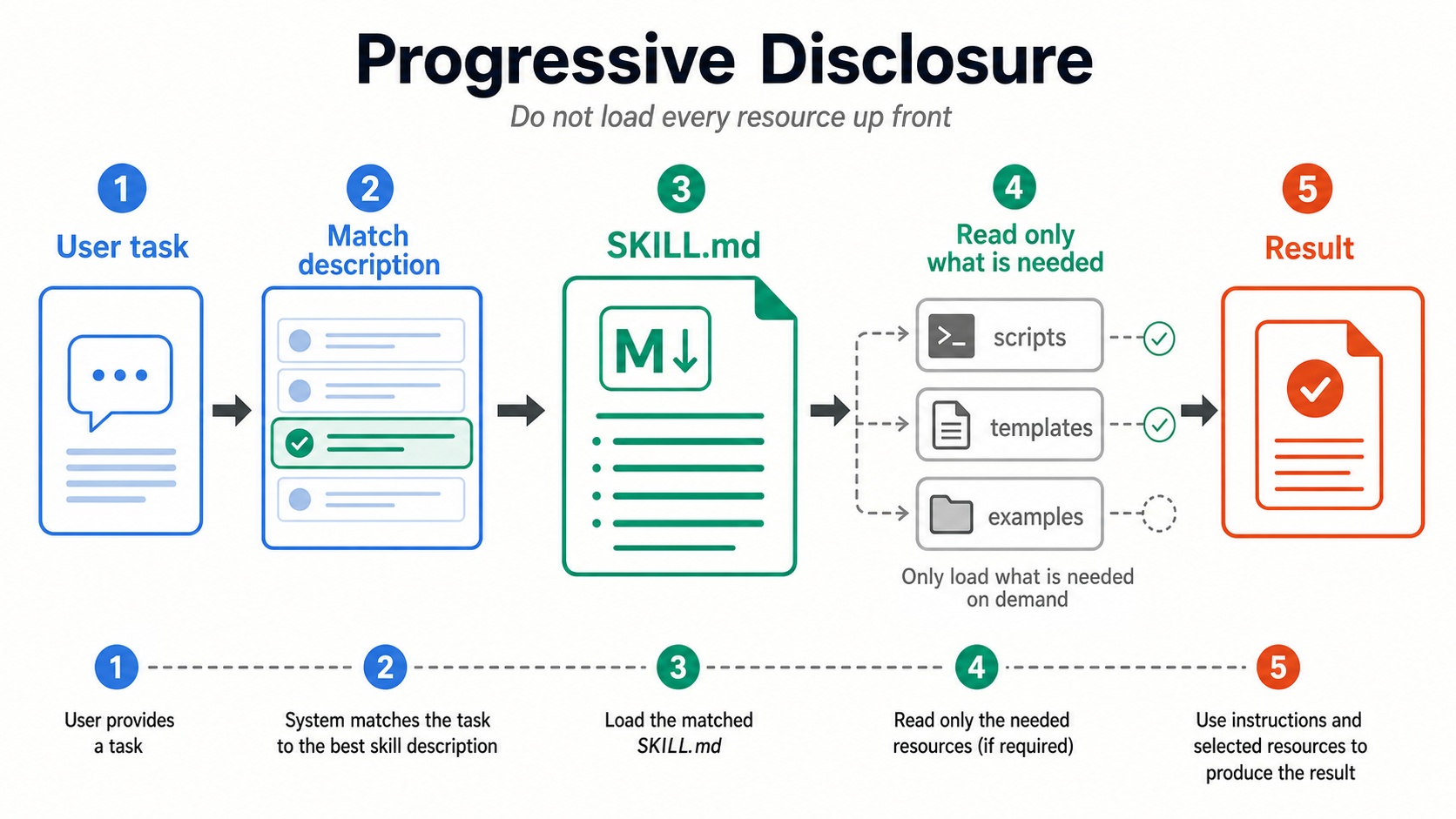
- Progressive Disclosure helps agents load only relevant skills on demand
- Clear separation from Custom Instructions (always-on) improves context efficiency
Quick Start (5 Minutes)
# 1. Create the skill directory
mkdir -p .github/skills/webapp-testing

# 2. Create SKILL.md
cat << 'EOF' > .github/skills/webapp-testing/SKILL.md
---
name: webapp-testing
description: >-
  Assists with web application test strategies and automated test creation.
  Use for topics related to testing, test, E2E.
---

## Procedure
1. Analyze the target code and determine testing strategy
2. Create test files following the AAA pattern
3. Run tests and verify results
EOF

# 3. Verify in VS Code
# Type /skills in the Chat panel
After placing the file, type /skills in VS Code Chat to confirm the skill appears in the list.
What Are Agent Skills
Skills are standardized packages of procedural knowledge
Agent Skills are a mechanism for providing AI coding agents with specialized procedural knowledge. In the GitHub Copilot ecosystem, agents reference procedures, scripts, and templates described in SKILL.md files on demand to improve task accuracy.
Agent Skills as an Open Standard
Agent Skills are an open format published at agentskills.io. GitHub Copilot supports skills in the cloud agent, code review, Copilot CLI, the Copilot app, and agent mode in VS Code and JetBrains IDEs1. Supported project locations are .github/skills, .claude/skills, and .agents/skills. For a full overview of the specification, see the Agent Skills Complete Guide (Beginner Edition).
How Skills Fit into Copilot
Copilot's context system consists of three layers:
The best way to think of skills is as "reusable procedural knowledge packages." They are not mere text instructions but complete folders containing assets such as scripts, templates, and reference documents.
Activation and Placement in VS Code
Configuration in settings.json
To enable skills in VS Code, configure the loading paths in settings.json.
{
  "chat.agentSkillsLocations": {
    ".github/skills/**": true,
    ".agents/skills/**": true
  }
}
How to Verify Configuration
Type /skills in the VS Code chat panel to open the Configure Skills menu. From there, you can view the list of currently loaded skills and toggle activation/deactivation.
Skill File Locations
Project Skills (Within a Repository)
project-root/
├── .github/
│   └── skills/
│       ├── webapp-testing/
│       │   └── SKILL.md          # Test automation skill
│       ├── doc-generator/
│       │   └── SKILL.md          # Documentation generation skill
│       └── release-workflow/
│           ├── SKILL.md          # Release procedure skill
│           └── checklist.md      # Reference resource
├── .claude/skills/               # Claude Code compatible
└── .agents/skills/               # Generic agent compatible
Recommended Location: .github/skills/
If you primarily use GitHub Copilot, placing skills in .github/skills/ is recommended. GitHub Docs supports .github/skills, .claude/skills, and .agents/skills for project skills. If cross-compatibility with other agent tools is a priority, consider .agents/skills/.
Personal Skills (User Local)
Skills that apply only to your personal work environment should be placed in your home directory.
~/.copilot/skills/         # Copilot only
~/.agents/skills/          # Generic agent compatible
Personal skills are not committed to the repository, making them ideal for defining personal preferences or environment-specific procedures.
Organization / Enterprise Level Skills
The current Copilot CLI reference documents remote skills distributed by organizations and enterprises2. They are resolved by name and fetched when needed. Availability depends on organization policy and distribution settings, so check the administrator configuration as well.
Manage Skills with GitHub CLI
GitHub CLI 2.90.0 and later can search, preview, install, update, and publish skills through the gh skill command group. This capability is in public preview. Preview third-party skills before installation1.
gh skill search testing
gh skill preview github/awesome-copilot documentation-writer
gh skill install github/awesome-copilot documentation-writer
gh skill update --all
SKILL.md Format
SKILL.md consists of a YAML frontmatter section followed by a Markdown body.
Frontmatter (Metadata)
---
# agentskills.io standard fields
name: webapp-testing              # Required: lowercase + hyphens, max 64 characters
description: >-                   # Required: max 1024 characters
  Assists with web application test strategies and automated test creation.
  Use for topics related to testing, test, E2E.
license: MIT                      # Optional
metadata:                         # Optional
  author: dev-team
  version: "1.0"
compatibility: >-                 # Optional: environment requirements, max 500 characters
  Requires Node.js 18+ and network access for npm install
# allowed-tools: Bash Edit ...    # Experimental

# Copilot-specific extension fields
argument-hint: "File path or module name of the test target"
user-invocable: true              # Allows manual invocation (default: true)
disable-model-invocation: false   # Disables model invocation when true
---
Field Details
| Field | Required | Source | Description |
|---|---|---|---|
name | Yes | Standard | Unique identifier. Lowercase with hyphens, max 64 characters |
description | Yes | Standard | Description, max 1024 characters. Include clear activation topics and keywords |
license | No | Standard | License name or reference to a bundled license file |
metadata | No | Standard | Arbitrary key-value metadata such as author and version |
compatibility | No | Standard | Environment requirements, max 500 characters |
allowed-tools | No | Standard | Restricts tools available to the skill; currently experimental |
argument-hint | No | Copilot extension | Argument hint shown for manual invocation in VS Code |
user-invocable | No | Copilot extension | true (default) allows manual invocation by users |
disable-model-invocation | No | Copilot extension | Set to true to disable automatic invocation by the model |
Standard vs. Copilot Extension
Standard fields are defined by the Agent Skills specification and can be shared with tools such as Claude Code and Codex. Copilot extension fields are interpreted by VS Code and GitHub Copilot.
The description is the primary signal for automatic activation
How You Write the Description Determines Activation Accuracy
Explicitly include topics and keywords that the skill covers in the description. Copilot reads the description to decide whether to activate a skill, so vague descriptions will prevent proper activation. For detailed keyword design guidance, see the Description Design Guide.
Body (Markdown)
Everything after the frontmatter is standard Markdown where you describe procedures, rules, output examples, and more.
## Goal
Improve test coverage and standardize quality.

## Procedure
1. Analyze the target code and determine the testing strategy
2. Create test files
3. Run tests and verify results

## References
- [Test Template](./test-template.js)
- [Naming Conventions Document](./naming-conventions.md)
Use Relative Paths for File References
When referencing other files from within SKILL.md, use relative paths from the SKILL.md file. Copilot loads these files as resources and includes them in context.
Progressive Disclosure (Staged Loading)
The key feature of Agent Skills is Progressive Disclosure (staged loading). This mechanism ensures that installing many skills does not overwhelm the context window.
Three-Stage Loading Process
The Progressive Disclosure stages (L1 Discovery → L2 Instructions → L3 Resources) are illustrated in the diagram above.
Why This Matters
The "Traditional Approach vs Agent Skills" comparison is shown in the diagram above.
Guideline for Number of Skills
GitHub does not publish a fixed recommended count or a fixed number of skills loaded per task. Keep each skill focused on one domain, rely on progressive disclosure, and use /skills to verify visibility and activation3.
Copilot Ecosystem Support Status
As of July 2026, the ecosystem support status is illustrated in the "SKILL.md Structure" diagram above. GitHub documents support in the cloud agent, code review, Copilot CLI, the Copilot app, and agent mode in VS Code and JetBrains IDEs1.
Using Skills with Copilot Coding Agent
Copilot can use project skills during autonomous work. For example, for an Issue saying "Add tests," it can follow the webapp-testing skill's procedures and create a PR.
Differentiating from Custom Instructions
Developer: "Add tests for the auth module"
Agent: Generates generic tests with no project conventions
- No naming conventions applied
- No AAA pattern structure
- No boundary value testing strategy
Developer: "Add tests for the auth module"
Agent: Loads webapp-testing skill → follows project procedures
- Test files: *.test.ts with describe/it format
- AAA pattern (Arrange-Act-Assert) applied
- Boundary values prioritized per skill instructions
Agent Skills and Custom Instructions serve different purposes. By using them appropriately, you can achieve both context efficiency and instruction precision.
| Aspect | Agent Skills | Custom Instructions (.instructions.md) | copilot-instructions.md |
|---|---|---|---|
| Purpose | Specialized workflows and procedures | Path-specific coding conventions | Base rules for the entire project |
| Loading | On demand (only when needed) | Pattern match (applyTo) | Always applied |
| Content | Procedures + scripts + examples + references | Instructions only | Instructions only |
| Portability | Open standard (shared across all tools) | VS Code specific | GitHub specific |
| Standard | agentskills.io | VS Code specific | GitHub specific |
| Granularity | Per task/topic | Per file path | Entire repository |
Decision Flowchart
Unified Cross-Tool Management with AGENTS.md
The AGENTS.md file allows you to manage common instructions for multiple agents such as GitHub Copilot, Claude Code, and OpenAI Codex in a single file. For details, see the Multi-Agent Collaboration Guide.
Custom Instructions Complete Guide →
How to write copilot-instructions.md and .instructions.md with design patterns
Path-based conditional instruction management
Practical Example: Test Automation Skill
Below is a complete example of a skill that assists with web application test automation.
Directory Structure
.github/skills/webapp-testing/
├── SKILL.md              # Skill definition
├── test-template.js      # Test template
└── naming-conventions.md # Naming conventions reference
SKILL.md
---
name: webapp-testing
description: >-
  Assists with web application test strategies and automated test creation.
  Use for topics related to testing, test, E2E, unit testing, and integration test.
license: MIT
metadata:
  author: dev-team
  version: "1.0"
---

## Goal
Improve test coverage and standardize test quality.

## Testing Strategy
1. **Unit Tests**: Prioritize boundary values for business logic
2. **Integration Tests**: Verify API endpoint + DB integration
3. **E2E Tests**: User flows (login -> action -> result verification)

## Naming Convention
- Test files: `*.test.ts` or `*.spec.ts`
- Test names: `describe('Feature Name') > it('expected behavior')` format

## Output Format
- Add schema validation before test execution
- Structure tests using the AAA (Arrange-Act-Assert) pattern
- Document intent with comments in each test

## References
- [Test Template](./test-template.js)
- [Naming Conventions](./naming-conventions.md)
List Keywords in the Description
By including related keywords such as "testing, test, E2E, unit testing, integration test" in the description, the skill will automatically activate when users touch on these topics.
Practical Example: Documentation Generation Skill
Here is an example of a skill that assists with auto-generating API documentation and READMEs. Unlike the test automation skill, this one focuses on output rules.
.github/skills/doc-generator/
├── SKILL.md              # Skill definition
├── readme-template.md    # README template
└── changelog-format.md   # CHANGELOG format reference
---
name: doc-generator
description: >-
  Assists with generating and updating API documentation, READMEs, and CHANGELOGs.
  Use for topics related to documentation, README, API doc, and CHANGELOG.
metadata:
  author: dev-team
  version: "1.0"
---

## Procedure
1. Read the target code and identify public APIs
2. Add JSDoc/docstring-style comments
3. Update the relevant sections of README.md
4. Append changes to the CHANGELOG (Keep a Changelog format)

## Output Rules
- Always specify the language in code blocks
- For API endpoints, include method, path, parameters, and response examples
- Mark breaking changes with a warning indicator

## References
- [README Template](./readme-template.md)
- [CHANGELOG Format](./changelog-format.md)
Best Practices for Creating Skills
1. Skill Granularity Design
1 Skill = 1 Domain of Expertise
Each skill should focus on a single domain of expertise. Combining "testing + deployment + documentation" into one skill consumes context even in irrelevant situations.
# Not Recommended: Scope too broad
name: everything-helper
description: Handles testing, deployment, documentation, and code review all at once

# Recommended: Focused domain of expertise
name: webapp-testing
description: Assists with web application test strategies and automated test creation
2. Description Design Principles
| Principle | Example |
|---|---|
| Include specific keywords | "testing, test, E2E, unit test" |
| Clearly state the target scope | "For web applications" |
| Describe actions with verbs | "assist," "generate," "verify" |
| Keep within 1024 characters | Concise yet comprehensive |
3. Leveraging Reference Resources
Keep the SKILL.md body to a procedural overview and separate detailed templates and scripts into separate files. This way, they are only loaded at Level 3 (Resources), improving context efficiency.
.github/skills/my-skill/
├── SKILL.md                # Procedural overview (loaded at Level 2)
├── templates/
│   ├── component.tsx       # Component template (Level 3)
│   └── test.spec.ts        # Test template (Level 3)
└── examples/
    └── sample-output.md    # Output example (Level 3)
Frequently Asked Questions (FAQ)
Q: What should I do if a skill does not activate?
- Check whether the skill is enabled using the
/skillscommand - Verify that the
chat.agentSkillsLocationspaths insettings.jsonare correct - Review whether appropriate keywords are included in the
description - Check whether
disable-model-invocation: trueis set - Verify the
user-invocablespelling and confirm thatnamematches the parent directory name
Q: Is there an upper limit on the number of skills?
No explicit technical limit has been stated. In practice, keep the enabled set focused and verify with /skills; Copilot CLI issue reports have shown cases where a large skill set was not fully listed.
Q: Can I use skills created in Claude Code with Copilot?
Yes. Since Agent Skills comply with the agentskills.io open format, you can simply copy (or symlink) a SKILL.md created in .claude/skills/ to .github/skills/. The format is the same.
Related Articles
Copilot Series
Custom Instructions Complete Guide
How to write and design patterns for copilot-instructions.md and .instructions.md
Conditional file path-based instruction management
AGENTS.md Unified Management Guide
Project instruction files usable across multiple AI tools
Multi-Agent Collaboration Guide
Strategies for using GitHub Copilot and Claude Code together
Reference Materials (Agent Skills Deep Dive)
- Agent Skills Complete Guide (Beginner Edition) -- Fundamentals of Agent Skills as an open format
- Agent Skills Installation Guide -- 10 ready-to-use examples and installation methods
- Description Design Guide -- How to write descriptions that improve skill activation accuracy