Codex CLI Auto Approve: Dangerously Skip Permissions Equivalent (2026)
For / Key Points
Audience:
- Developers searching for Codex auto approve, full auto, no-approval mode, or the dangerously skip permissions equivalent
- Teams confused by the interaction between
approval_policy,sandbox_mode, and network access - Readers comparing Codex CLI with Claude Code permission behavior
Key Points:
- Claude Code's
--dangerously-skip-permissionsmaps closest to Codex CLI's--dangerously-bypass-approvals-and-sandbox/--yolo, not to normal auto approval - For explicit no-prompt automation with a sandbox, use
codex -a never -s workspace-write exec - Config profiles and permission profiles are separate; full bypass belongs only in externally isolated environments
Quick Answer
| If you want to... | Start with | Why |
|---|---|---|
Find the Claude Code --dangerously-skip-permissions equivalent | codex --dangerously-bypass-approvals-and-sandbox or codex --yolo | This bypasses approvals and sandboxing, so use it only inside externally isolated environments |
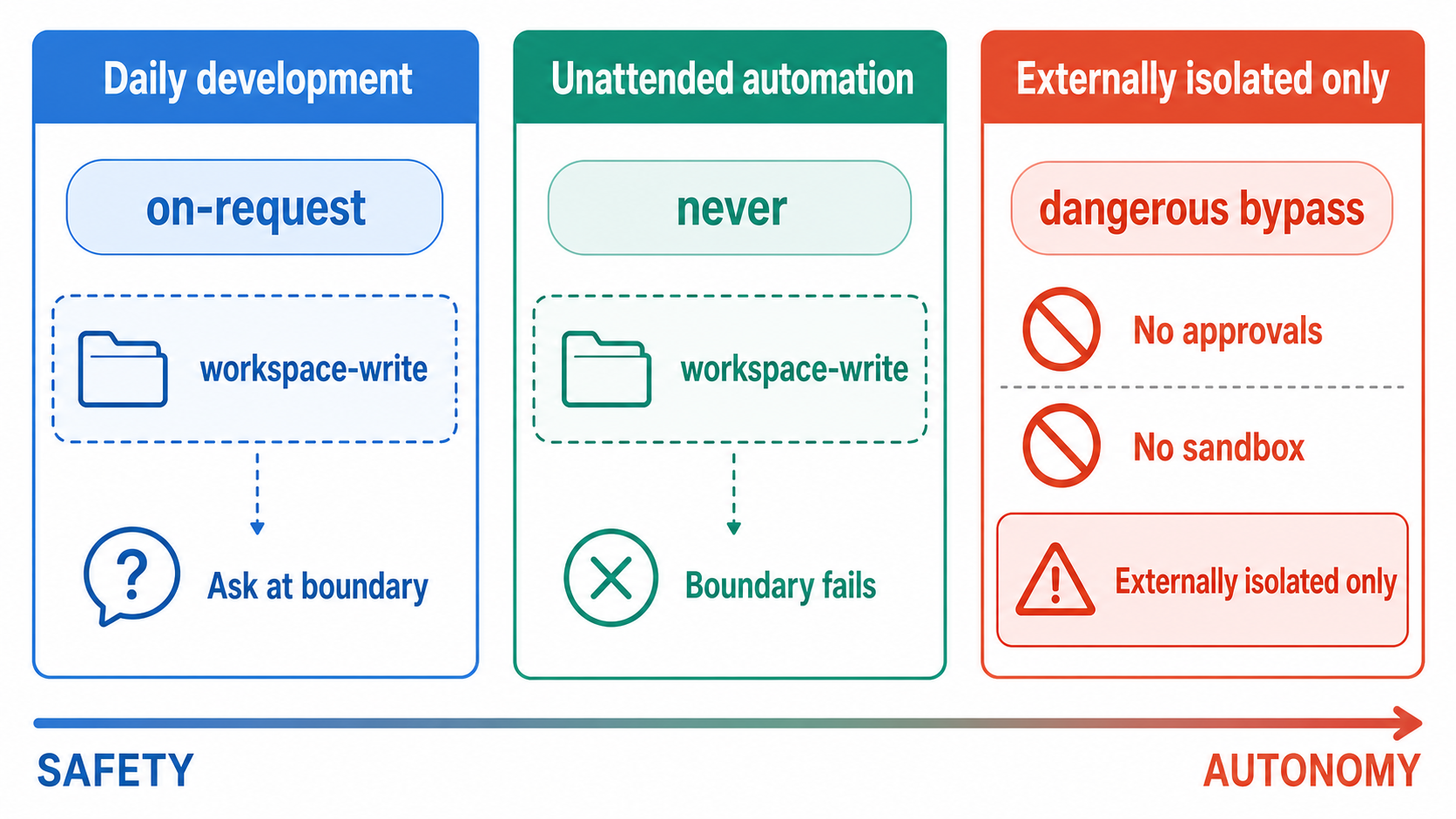
| Run unattended automation without prompts | codex -a never -s workspace-write exec | It never asks and returns out-of-bound failures to the model |
| Automate workspace work but review boundary crossings | codex -a on-request -s workspace-write | Workspace actions proceed; requests beyond the boundary require approval |
| Stop approval prompts but still keep file guardrails | codex -a never -s workspace-write -c 'sandbox_workspace_write.network_access=true' | Fewer prompts without jumping to full access |
Related decision
If your main goal is to stop unplanned edits rather than skip approvals, read How to Use Codex Plan Mode first.
The Core Problem
Codex CLI auto-approval is not controlled by a single switch. In practice, current docs expose two configuration models:
- Permission profiles (beta): policies such as
:read-only,:workspace, and:danger-full-accessthat combine filesystem and network boundaries - Sandbox and approval settings: the stable CLI/configuration model built from
approval_policy,sandbox_mode, andnetwork_access
Do not mix a permission profile with the older sandbox_mode settings in the same configuration. Pick the model that your session or automation uses, then keep the risk boundary explicit.2
2026 Update: Dangerous Bypass, Permission Profiles, and exec --full-auto
The search phrase "Codex dangerously skip permissions" now maps to a specific Codex CLI answer:
codex --dangerously-bypass-approvals-and-sandbox "Task"

# Short alias
codex --yolo "Task"
That command is the closest Codex equivalent to Claude Code's --dangerously-skip-permissions, but it is also the most permissive path. OpenAI's current CLI docs describe it as bypassing approvals and sandboxing, and the security guidance reserves it for externally hardened or isolated environments.4
For non-interactive automation with no approval wait, state both controls explicitly:
codex -a never -s workspace-write exec "Run tests and fix failures"
codex exec --full-auto still exists as a deprecated compatibility flag, but current docs point users toward --sandbox workspace-write instead.4
To select a permission profile, start the CLI and enter /permissions. There is no --permission-profile CLI flag.
codex
/permissions
To make one the default, set default_permissions = ":workspace" in config.toml. Permission profiles are beta; if a loaded layer contains sandbox_mode or [sandbox_workspace_write], Codex uses the older sandbox settings instead.2
Use :danger-full-access or the dangerous bypass flag only when the surrounding host, container, or CI runner is disposable and externally guarded.
Legacy Sandbox Model
Many existing examples still use the older three-axis model:
approval_policy: how often the agent asks for approvalsandbox_mode: how far file and command access can gonetwork_access: whether outbound network calls are allowed
The common mistake is to look only at approval_policy. In reality, sandbox_mode matters just as much, and --full-auto does not enable network access by default.1
on-request versus never
on-request + workspace-write automates work inside the workspace and asks before crossing the boundary. never + workspace-write never asks; blocked operations fail and are returned to the model. Use the latter when the goal is to eliminate approval waits.1
Quick Start
If you remember only three commands, make them these:
# 1) Non-interactive, no prompts, workspace only
codex -a never -s workspace-write exec "Run unit tests and fix failures"

# 2) Keep the sandbox but allow network access
codex -a never -s workspace-write \
  -c 'sandbox_workspace_write.network_access=true' \
  "Update deps and run migrate"

# 3) Strong automation for isolated environments only
codex --dangerously-bypass-approvals-and-sandbox \
  "Non-interactive build and deploy"
Which mode to choose first
Start interactive work with -a on-request -s workspace-write, or unattended work with -a never -s workspace-write, before considering unrestricted modes.
Three Configuration Methods
Method 1: Use CLI Flags Per Run
This is the simplest way to switch modes for one-off work.
# Interactive: ask only when crossing the boundary
codex -a on-request -s workspace-write "Fix failing tests"

# Unattended: never ask, stay inside the boundary
codex -a never -s workspace-write exec "Fix failing tests"

# Safe mode with network access
codex -a never -s workspace-write \
  -c 'sandbox_workspace_write.network_access=true' \
  "Install packages and run migration"

# Full access
codex -a never -s danger-full-access "Refactor and run full local build"
Best for:
- one-off tasks
- ad hoc experiments
- sessions where the risk level changes task by task
Method 2: Use config.toml and Config Profiles
If you use the same configuration repeatedly, config profiles are faster and less error-prone.
Put normal defaults in ~/.codex/config.toml.
approval_policy = "on-request"
sandbox_mode = "workspace-write"
In Codex 0.134.0 and later, --profile networked overlays ~/.codex/networked.config.toml. The old [profiles.networked] table is no longer read.6
# ~/.codex/networked.config.toml
approval_policy = "never"
sandbox_mode = "workspace-write"

[sandbox_workspace_write]
network_access = true
Launch examples:
codex --profile networked "Update dependencies"
Best for:
- teams that want standard defaults
- stable local workflows
- environments where safe defaults should be pinned
Method 3: Override One Setting with -c
Use this when the base profile is fine and only one setting needs to change.
# Strengthen approval behavior just for this run
codex -c 'approval_policy="never"' "Task"

# Change sandbox behavior temporarily
codex -c 'sandbox_mode="read-only"' "Analyze project structure"

# Add network without rebuilding the whole profile
codex -c 'sandbox_workspace_write.network_access=true' \
  "Fetch release notes"
Best for:
- small deviations from a stable profile
- scripts and CI wrappers
- temporary experiments
Configuration Priority
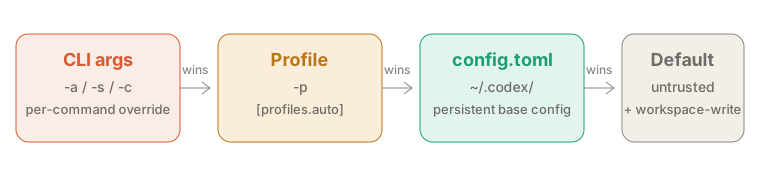
- CLI flags and
-c - Trusted project
.codex/config.tomlfiles, with the nearest directory winning - The
$CODEX_HOME/<name>.config.tomlselected by--profile - User
$CODEX_HOME/config.toml - System config
- Built-in defaults7
Mode Matrix
If you want to understand the three-axis model quickly, try the simulator first.
| Use case | approval_policy | sandbox_mode | Network | Special flag | Risk |
|---|---|---|---|---|---|
| Daily default | on-request | workspace-write | off | none | Medium |
| Unattended with boundary | never | workspace-write | off | none | Medium |
| Safe networked run | never | workspace-write | on | -c 'sandbox_workspace_write.network_access=true' | Medium-High |
| Full access run | never | danger-full-access | on | none | High |
| Read-only review | never | read-only | off | none | Low |
Claude Code Mapping
Codex CLI separates approval behavior and sandbox behavior more explicitly than Claude Code. That gives you more room to tune the risk level.
| Claude Code | Codex CLI | Meaning |
|---|---|---|
claude --dangerously-skip-permissions | codex --dangerously-bypass-approvals-and-sandbox | Fully unrestricted execution |
| Default Claude workflow | codex -a on-request -s workspace-write | Automate workspace work and review boundary crossings |
| Conservative consultative workflow | Enter /permissions in the CLI → Read-only | Keep the session focused on inspection and consultation |
allowedTools / permission rules | /permissions, approval policy, sandbox, and Rules | Fine-tune what Codex can do automatically |
| Hooks | Rules / hooks / skills | Workflow shaping and automation |
About the term Plan mode
Codex now has a built-in /plan command, and that is not the same thing as read-only.23 Read-only is a safety policy. /plan is the act of drafting the plan first.
Security and Best Practices
Four Core Rules
- Default to
workspace-writefor normal development - Treat network as off by default in
workspace-writeand enable it only when needed - Pair stronger modes with external guardrails such as PR review or CI isolation
- Keep logs when approvals are reduced
Safer Default Commands
# Daily work: review boundary crossings
codex -a on-request -s workspace-write "Task"

# Unattended: no prompts, out-of-bound actions fail
codex -a never -s workspace-write exec "Task"

# Networked work
codex -a never -s workspace-write \
  -c 'sandbox_workspace_write.network_access=true' \
  "Task"
Commands to Avoid
# Unrestricted execution on production hosts
codex --dangerously-bypass-approvals-and-sandbox "Deploy to production"

# Hardcoded secrets
codex -a never "Use API key sk-xxxxxx"

# Full access combined with broad deletion
codex -s danger-full-access "Delete old files recursively"
Minimum Governance Baseline
Common Troubleshooting
This page stays focused on approval mode configuration. For reconnect loops and context overflow, the dedicated articles are faster and more complete.
| Symptom | Check first | Next action |
|---|---|---|
gh or curl fails under workspace-write | Network is still off by default | Add sandbox_workspace_write.network_access=true |
| Settings do not take effect | Which layer is winning | Check CLI, project, profile, user, and system layers |
| The chosen mode feels too strong | Whether danger-full-access is active | Move back to workspace-write |
Long runs show re-connecting... | Outside this article's scope | Read Re-connecting issue guide |
| Runs stop on context window errors | Outside this article's scope | Read context window error guide |
FAQ
What is the default way to reduce approvals in Codex CLI?
For interactive work, use codex -a on-request -s workspace-write. To eliminate approval waits in non-interactive work, use codex -a never -s workspace-write exec.
Can I keep the sandbox and allow only network access?
Yes. Use codex -a never -s workspace-write -c 'sandbox_workspace_write.network_access=true'. This keeps file protections while enabling outbound network calls.
What is the Codex CLI equivalent of Claude Code's --dangerously-skip-permissions?
The closest equivalent is codex --dangerously-bypass-approvals-and-sandbox. Treat it as an isolated-environment or CI-only mode.
Why does workspace-write block network calls?
Because the workspace sandbox keeps network access off by default. Add sandbox_workspace_write.network_access=true only when needed.
Which wins: CLI flags or config.toml?
CLI flags win first, followed by project config, the selected profile file, user config, system config, and built-in defaults.
Summary
codex -a never -s workspace-write execis the explicit no-prompt, sandboxed baseline--dangerously-bypass-approvals-and-sandbox/--yolois the Codex equivalent readers are usually searching for, but it is only for isolated environments- When network access is needed, keep
workspace-writeand enable network separately - Reserve
danger-full-accessand full bypass for isolated environments only - Permission profiles are beta and separate from config profiles; do not mix them with legacy sandbox settings
Related Articles
- Codex CLI Complete Guide
- Codex CLI Best Practices
- How to Remove Codex CLI Network Restrictions
- How to Fix the Codex CLI Re-connecting Loop
- How to Fix Codex CLI Context Window Errors
- Claude Code Auto Permission Guide
Codex agent approvals & security — current approval, sandbox, and network behavior. ↩↩
Codex permission profiles — beta permission profiles and the warning not to mix them with legacy sandbox settings. ↩↩↩
Codex CLI slash commands — current
/planand/permissionsbehavior. ↩Codex CLI command reference — current dangerous bypass,
--yolo, approval, and sandbox flags. ↩↩Codex permissions — permission modes including Read-only. ↩
Codex advanced configuration — profile-file format in Codex 0.134.0 and later. ↩
Codex config basics — configuration layers and precedence. ↩