GitHub Outages in 2026: A Resilience Plan and the State of Forge Alternatives
The implementation order
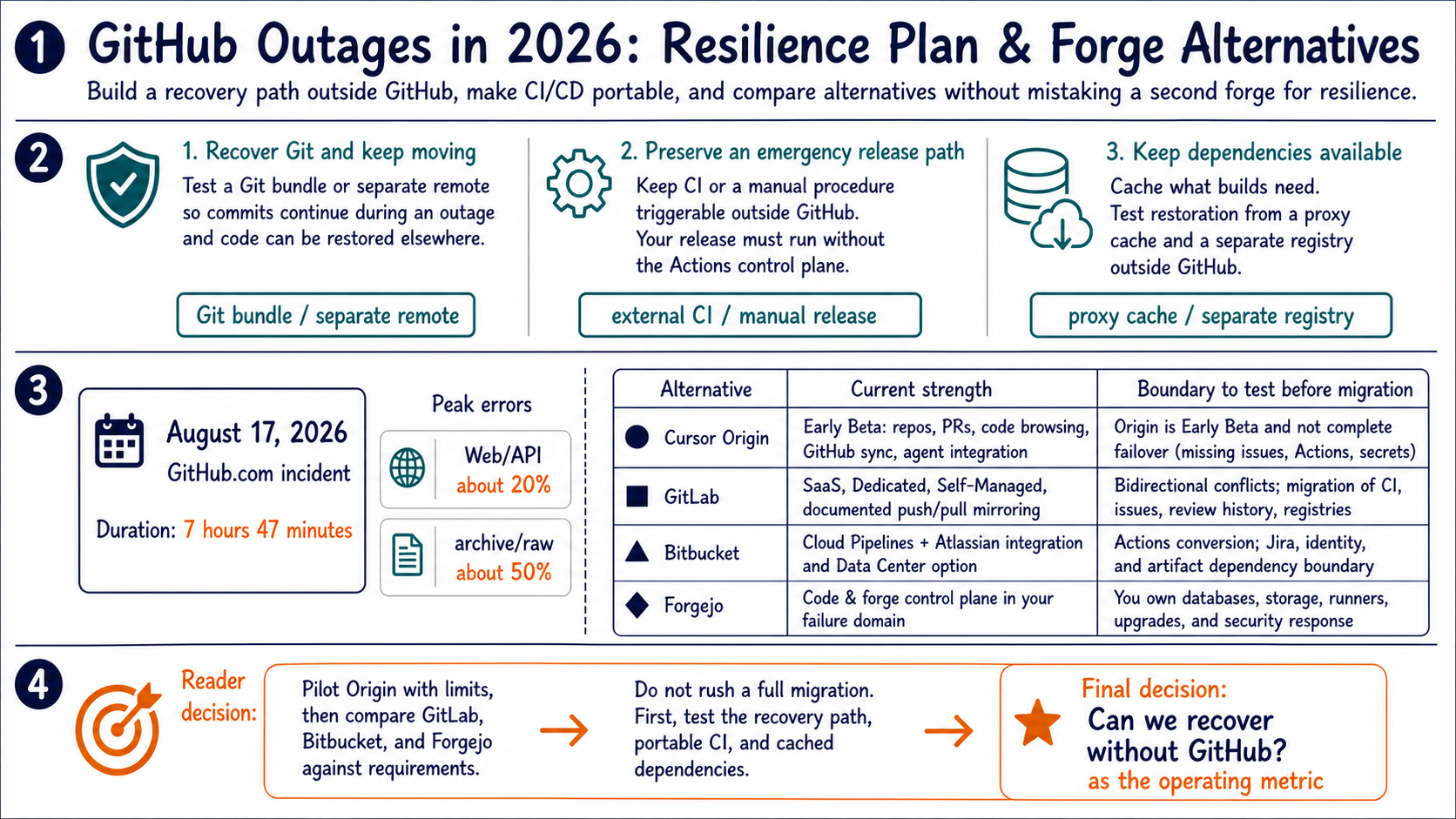
The August 17, 2026 GitHub.com incident lasted 7 hours and 47 minutes. Peak errors reached about 20% for web/API traffic and about 50% for archive and raw-content downloads.1 GitHub outage preparation should begin with an independent recovery path and portable CI/CD, not an immediate migration to another forge.
| Decision for a technical leader | Implement now |
|---|---|
| Keep code recoverable and work moving | Test an offsite Git bundle or separate remote |
| Preserve an emergency release path | Keep CI or a manual procedure triggerable outside GitHub |
| Keep dependencies available | Test restoration from a proxy cache and separate registry |
| Evaluate an alternative forge | Pilot import and export with a non-critical repository |
Status records show a recurring operating risk
The GitHub Status API contains 15 incident records from the start of that month through the large incident. The set includes minor entries such as Copilot model-provider disruptions, so it is not a count of site-wide GitHub.com outages. This article treats the heterogeneous records as a risk signal for rehearsing loss of repository hosting, pull requests, Actions, identity, or AI assistance—not as proof that all of GitHub is continuously unreliable.2
Local Git keeps development moving during an outage
Commits, branches, merges, diffs, history, and conflict resolution work locally without GitHub. The outage rule should be to continue committing while holding shared integration and releases until the team has a safe remote path.
git switch -c outage/work
git status
git diff
git log --oneline
git commit
A developer clone is not, by itself, a backup. It may omit un-fetched branches, Git LFS objects, issues, pull-request comments, release assets, Actions secrets, and other GitHub-specific state. Teams need one procedure for restoring Git objects and another for restoring forge metadata.
A separate remote or bundle creates the Git recovery path
An independent remote and an offline-verifiable Git bundle provide a minimal recovery path.
git remote add mirror <secondary-remote-url>
git push mirror --all
git push mirror --tags

git bundle create repository.bundle --all
git bundle verify repository.bundle
Git's documentation says multiple push URLs on one remote should refer to the same place—the content pushed should be what an immediate fetch returns. A separately named mirror remote is clearer than adding a different forge as another push URL on origin, and it makes partial success easier to monitor.3
A Git bundle can store every object reachable from the selected refs and can be verified and cloned offline. It does not include a working tree, index, stash, hooks, or repository configuration.4 A backup becomes credible when a clean environment can clone it and recover the expected default branch and tags, not when the backup job merely reports success.
The storage path should avoid GitHub's identity provider, cloud region, secret store, and deployment dependencies. Different cloud brands do not guarantee different failure domains; map identity, DNS, networking, artifacts, and deployment endpoints explicitly.
A self-hosted Actions runner is not an independent fallback
A GitHub self-hosted runner still depends on the Actions control plane, so it is not an escape route by itself. The runner application connects to GitHub to accept work. If workflow scheduling or Actions control services are unavailable, a machine in the team's own data center cannot receive a new job.5
An external CI control plane or a documented manual release path is the actual fallback.
An emergency release path needs one of two tested mechanisms.
- External CI: the same container, tests, and deployment commands can be started from a control plane outside GitHub.
- Documented manual release: an operator can start the release outside GitHub without bypassing signing, approval, rollback, or audit requirements.
Keep build and test logic in repository scripts or a task runner, with GitHub Actions acting as a thin adapter. Replicate container images, packages, SBOMs, and release artifacts outside GitHub Packages and test restoration from that copy.
Raw-content dependencies and incident monitoring need separate paths
A build that downloads directly from raw.githubusercontent.com, GitHub Releases, or an action repository can fail even when the source code is already available locally. A proxy cache such as Nexus or Artifactory, an internal registry, or a vendored dependency with a fixed checksum can isolate an upstream outage and make supply-chain changes visible.
GitHub Status offers Atom and RSS feeds.6 Feed incident changes into the same monitoring timeline as internal deployment failures. Status alerts do not provide recovery, but they can stop a team from spending an outage debugging its own code.
GitHub treats workload growth as a structural reliability program
GitHub attributed the August incident to network saturation at load balancers in Central US after a service-mesh sidecar hit concurrency limits and failed to autoscale correctly. Retries amplified traffic and spread the impact across services.1 GitHub did not say that AI agents directly caused this incident.
GitHub has separately reported that agentic workflows, repository creation, pull requests, APIs, automation, and large repositories are growing sharply. It is isolating Git and Actions, removing single points of failure, reducing blast radius, and pursuing a longer-term multi-cloud path.7
It would therefore be inaccurate to generalize that AI agents directly caused the August incident. GitHub's long-term response to workload growth and the direct cause of the August 17 incident need to be evaluated separately. Customers should manage their own recovery time and dependency boundaries rather than waiting for that program to finish.
Forge alternatives occupy different positions today
Pilot Origin for a limited workload; choose GitLab, Bitbucket, or a self-managed Forgejo deployment when current requirements justify migration.
| Candidate | Current strength | Boundary to test before migration |
|---|---|---|
| Cursor Origin | Early-beta repositories, pull requests, code browsing, GitHub sync, and agent integration | A mirror keeps GitHub as source of truth and excludes issues, Actions workflows, and secrets |
| GitLab | SaaS, Dedicated, and Self-Managed options with documented push/pull mirroring | Bidirectional conflicts and migration of CI, issues, review history, and registries |
| Bitbucket | Cloud Pipelines and Atlassian integration, plus a self-managed Data Center option | Actions conversion and the combined Jira, identity, and artifact dependency boundary |
| Forgejo | Code and the forge control plane can run in the team's failure domain | The team owns databases, object storage, runners, upgrades, and security response |
Origin is rolling out in early beta on paid plans and lets teams synchronize GitHub repositories for code browsing, pull requests, and Cursor agents.8 For a repository that began on GitHub, GitHub remains the source of truth and pushes flow there. Issues, Actions workflows, and secrets are outside the mirror, so the design is not complete GitHub failover.9
GitLab documents push and pull mirroring and warns that bidirectional mirroring can create conflicts.10 Bitbucket offers Cloud and Data Center deployment models, with Pipelines integrated into Cloud.11 Forgejo Actions uses separate runners and familiar workflow syntax, but its documentation explicitly does not promise GitHub Actions compatibility.12
Another forge does not create resilience automatically
This article does not compare long-term availability under a common test. Moving to GitLab.com or Bitbucket Cloud changes the SaaS concentration point, while self-hosting Forgejo transfers operational responsibility to the team. Origin still lacks enough public operating history and settled enterprise controls for a production reliability comparison. Confidence in the recovery design is high, but the comparative forge assessment remains medium because availability has not been measured under common conditions.
Evaluate these boundaries before feature lists.
- Code custody: storage location, encryption, administrator access, subprocessors, and contract-end export
- Identity: SAML/OIDC, SCIM, emergency access, and recovery when the identity provider is unavailable
- Review data: migration of issues, pull requests, comments, approvals, branch protection, and audit logs
- Delivery: reproduction of runners, secrets, OIDC, registries, artifacts, and environment approvals
- Exit test: export a representative repository, then clone, build, and release it elsewhere
The relevant question is not whether a candidate is “faster than GitHub.” It is whether the team can restore its release path within an acceptable period. A vendor throughput demo may show a design goal for agent load, but it does not establish an SLA, durability, incident response, or review quality.
Keep GitHub while building the way out
There is no need to decide on a full migration first. Keep GitHub's open-source network and Actions ecosystem while ensuring that code, tests, and deployment can be restored without GitHub.
The ownership model is straightforward.
- The platform team owns restore tests for the separate remote or bundle and export of GitHub-specific data.
- The CI owner owns common repository build scripts and a trigger outside GitHub.
- The security team approves code custody, identity, audit, and exit conditions for the mirror target.
- The pilot team tests import and export in both directions with a non-critical repository.
Origin's production features and enterprise controls may later change the comparison. Until then, operate against a measurable question: can the team recover when GitHub is unavailable?
Related Articles
- What GitHub's internal repository breach teaches about development controls
- Cloudflare OS as an enterprise agent workspace
- Choosing Claude Code or Codex by work structure
Sources
GitHub Status incidents API, incident
zkxwbgr0cnmx. It records the impact window, affected services, peak errors, immediate cause, and retry amplification. ↩↩GitHub Status incidents API. The count includes records whose
started_atfalls from the beginning of the month through the large incident. It includes minor entries and is not presented as a site-wide outage count. ↩Git, “git-remote Documentation”, covering push/fetch URL semantics and the use of separate remotes for different destinations. ↩
Git, “git-bundle Documentation”, covering full bundles, verification, cloning, and excluded local state. ↩
GitHub Docs, “Self-hosted runners reference”, describing the runner application's connection to GitHub to accept jobs. ↩
GitHub Status, which exposes Atom and RSS feeds. ↩
GitHub, “An update on GitHub availability”, April 28, 2026, covering agentic workload growth, service isolation, single-point-of-failure reduction, and a multi-cloud path. ↩
Cursor, “Origin Code Hosting”, August 17, 2026, covering early-beta access, paid plans, repositories, pull requests, GitHub sync, and agent integration. ↩
Cursor Docs, “Mirror a GitHub repository”, distinguishing mirrored data, excluded data, GitHub's source-of-truth role, and detachment. ↩
GitLab Docs, “Repository mirroring”, covering deployment offerings, push/pull mirrors, and bidirectional-conflict risk. ↩
Atlassian, “A brief overview of Bitbucket” and Bitbucket Pipelines, covering Cloud, Data Center, and integrated CI/CD. ↩
Forgejo Docs, “Forgejo Actions”, covering separate runners, workflow locations, and the GitHub Actions compatibility boundary. ↩