How to Fix Claude Code "API Error: 401" When /login Fails
For / Key Points
Audience: Developers locked out of Claude Code by persistent API Error: 401 that even /login cannot fix
Key Points:
- Check
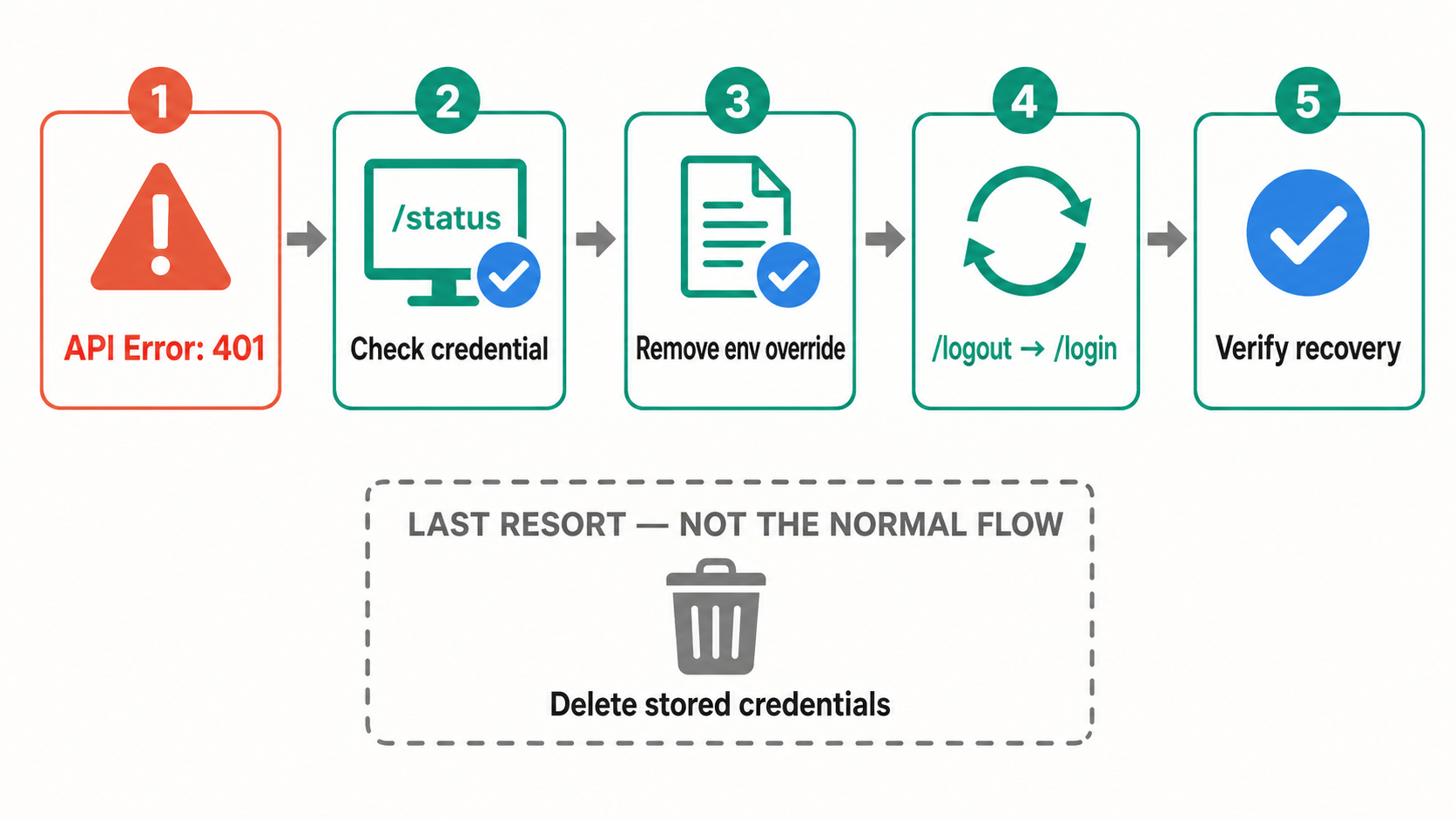
/statusfirst because an API key or provider credential can override subscription OAuth - The current recovery order is
/login, then/logoutfollowed by/loginif the error returns1 - Delete stored credentials only after the supported sign-in flow and credential checks fail
What the Error Looks Like
You launch Claude Code one morning and the terminal greets you with a red error message.
API Error: 401 {"type":"error","error":{"type":"authentication_error",
"message":"Invalid authentication credentials"}}

Please run /login
You run /login as instructed, but the error returns. This can indicate an expired OAuth login, a revoked token, or a stale environment variable overriding the account you expected Claude Code to use.12
The error comes in several variations:
Invalid authentication credentialsInvalid API keyOAuth token has expired. Please obtain a new token or refresh your existing token.
The wording matters. An expired OAuth token, an invalid API key, and a disabled Console organization use different credential sources, so deleting files before checking /status can hide the actual cause.
Why This Happens
Claude Code resolves several credential sources before it reaches subscription OAuth. Cloud-provider credentials, ANTHROPIC_AUTH_TOKEN, ANTHROPIC_API_KEY, apiKeyHelper, and CLAUDE_CODE_OAUTH_TOKEN can all take precedence over credentials created by /login.2
That ordering explains a common surprise: /login succeeds, but requests still use an expired API key exported by a shell profile or project environment. The fix is to identify the active credential before replacing it.
The Fix
Confirm the active credential, remove unintended overrides, and then use the supported sign-in commands. Manual credential deletion is the final recovery step.
Step 1: Check the Active Credential
Run the following inside Claude Code:
/status
If you intend to use a Claude subscription, check whether an environment variable is overriding it.
macOS / Linux / WSL:
env | grep ANTHROPIC
unset ANTHROPIC_API_KEY ANTHROPIC_AUTH_TOKEN
Windows PowerShell:
Get-ChildItem Env:ANTHROPIC*
Remove-Item Env:ANTHROPIC_API_KEY -ErrorAction SilentlyContinue
Remove-Item Env:ANTHROPIC_AUTH_TOKEN -ErrorAction SilentlyContinue
Remove the same variables from your shell profile, .env loader, or Windows user environment if they return in a new terminal.
Step 2: Sign In Again
Use the current sign-in flow inside Claude Code.1
/login
If the 401 returns in the same session, fully clear the stored login and authenticate again.
/logout
/login
Step 3: Delete Stored Credentials Only as a Last Resort
Use this step only when /logout cannot clear the broken state. Claude Code stores credentials in macOS Keychain, ~/.claude/.credentials.json on Linux, and %USERPROFILE%\.claude\.credentials.json on Windows. When CLAUDE_CONFIG_DIR is set on Linux or Windows, the file is stored under that directory instead.2
Linux / WSL:
rm -f "${CLAUDE_CONFIG_DIR:-$HOME/.claude}/.credentials.json"
Windows PowerShell:
$configDir = if ($env:CLAUDE_CONFIG_DIR) { $env:CLAUDE_CONFIG_DIR } else { "$env:USERPROFILE\.claude" }
Remove-Item "$configDir\.credentials.json" -Force -ErrorAction SilentlyContinue
On macOS, use Keychain Access or claude doctor to diagnose Keychain access rather than relying on an undocumented Keychain service name.3
Step 4: Verify
Launch Claude Code and run the following inside the interactive session.
/status
If you see your account info (auth method, subscription type), the recovery is complete.
If It Still Does Not Work
Three additional checks help when re-authentication does not resolve the issue.
Update Claude Code
Older versions may have auth-flow bugs or stale credential handling behavior.
claude update
claude --version
Use an API Key Directly (Bypass OAuth)
You can deliberately use Anthropic Console billing by providing an API key.
- Go to Anthropic Console and create an API key
- Set the environment variable
export ANTHROPIC_API_KEY="sk-ant-api03-xxxxx"
ANTHROPIC_API_KEY takes precedence over subscription OAuth after approval and uses the Console account associated with that key.2 Do not keep a backup key exported by default: a revoked key or disabled Console organization can cause the same authentication failure, and the usage follows a different billing path.
Check for Service Outages
What looks like an auth error may actually be an Anthropic infrastructure incident.
During outages, authentication endpoints are also affected. In that case, the only option is to wait.
Preventing Recurrence
These practices reduce recovery time the next time auth gets stuck.
- Use
/statusto confirm the credential source before changing files - Keep API-key variables scoped to the terminal or automation that actually needs them
- Update Claude Code regularly so authentication fixes are applied
Summary
Claude Code 401 errors are not all the same. /status and the authentication precedence determine whether the failed credential is OAuth, an API key, a helper, or a cloud-provider credential.
Start with /login; if the error returns, use /logout followed by /login. Delete the stored credential only when that supported flow cannot clear the state, and use an API key only when you intentionally want Console authentication and billing.
Related Articles
- Claude Code Complete Guide
- Claude Code Reference Guide
- Fix Claude Code "command not found / not recognized"
- Claude Code Windows Native Installation Guide
- Claude Code Auto Permission Guide
- Claude Code x Codex CLI Review Loop Automation
Error reference - Claude Code Docs — current recovery steps for expired or revoked OAuth tokens and invalid API keys. ↩↩↩
Authentication - Claude Code Docs — credential storage locations and authentication precedence. ↩↩↩↩
Troubleshoot installation and login - Claude Code Docs — Keychain diagnostics and login troubleshooting. ↩