Move Codex from WSL to Windows and Recover Missing Sidebar History
Verified outcome and material constraints
In the tested environment, this procedure moved Codex from WSL to native Windows and restored the sidebar index for more than 1,000 normal and archived sessions.
- Back up the WSL, legacy Windows CLI, and current Windows stores separately
- Move only
rollout-*.jsonl; do not mix SQLite state, credentials, or configuration - Directly resume one migrated thread ID before processing the full set
- Rebuild normal and archived indexes through the Codex
app-serverAPI
The commands and generated JSON Schema were rechecked with Codex CLI 0.144.4. Because app-server is experimental, generate the schema bundled with your installed version before using it.
When older threads disappear from the Codex sidebar, the conversation data is not necessarily gone. WSL and native Windows can point to different CODEX_HOME directories, while the Windows state database has no index rows for the sessions stored in WSL.
This article documents the procedure that actually merged those distributed sessions and restored both normal and archived sidebar entries. Usernames, thread IDs, project names, personal data, and the real storage layout have been replaced with public placeholders.
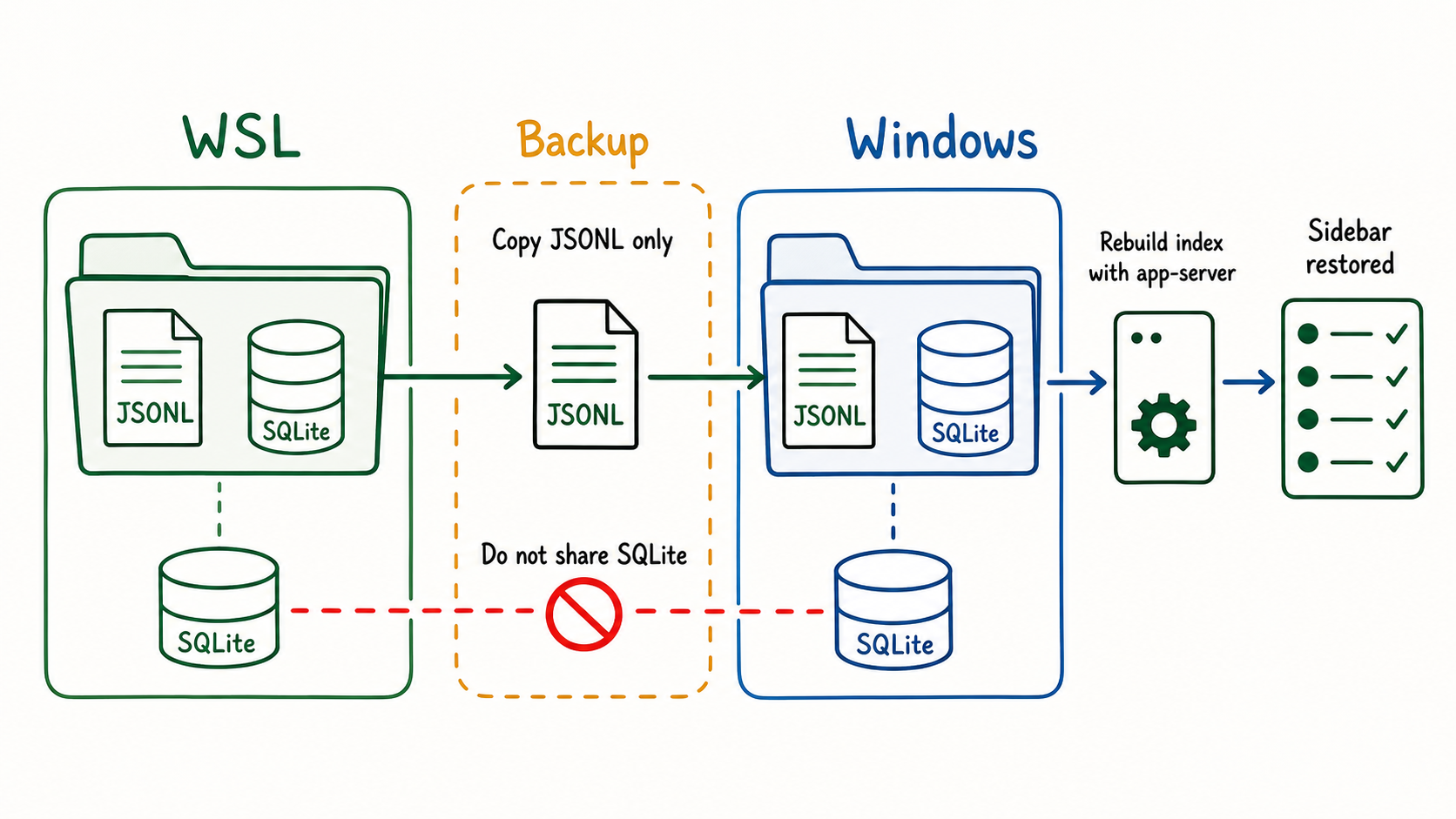
Missing history usually means the storage and index layers are separated
Codex stores local state under CODEX_HOME. The official Configuration Reference says this root includes configuration, authentication, logs, sessions, and other state.1
After moving to the Windows app, separate sessions may remain in three locations:
| Store | Example path |
|---|---|
| WSL | /home/<WSL_USER>/.codex |
| Legacy native Windows CLI | C:\Users\<WINDOWS_USER>\.codex |
| Current Windows installation | C:\Users\<WINDOWS_USER>\AppData\Local\OpenAI\CodexAppHome |
Do not assume a fixed Windows path. The current Windows documentation identifies %USERPROFILE%\.codex, but an app distribution or migrated installation may use another location. Confirm the effective location with codex doctor.2
The transcript and list index belong to different layers.
| Layer | Main contents | Migration treatment |
|---|---|---|
rollout-*.jsonl | Conversation, tool activity, and session metadata | Merge without overwriting after backup |
state_*.sqlite | State database, including thread-list data | Do not copy between runtimes |
auth.json or OS keychain | Credentials | Do not migrate with transcripts |
config.toml | Local configuration | Keep environment-specific |
.codex-global-state.json | App UI state | Do not migrate with transcripts |
OpenAI also explains that local chats remain on that computer and Codex history is separate from ordinary ChatGPT history.3
Stop Codex and identify all three stores first
Exit the Codex or ChatGPT desktop app and any Codex CLI process before backing up or rebuilding indexes. PowerShell can check the relevant process names:
Get-Process -Name Codex,ChatGPT -ErrorAction SilentlyContinue |
  Select-Object ProcessName, Id, StartTime
Then inspect the native Windows Codex installation:
codex --version
codex doctor --summary --no-color --ascii
For machine-readable diagnostics, inspect the redacted JSON locally:
$doctor = codex doctor --json | ConvertFrom-Json
$doctor.checks | Format-List
The JSON shape can change between Codex versions. Inspect the current report for the effective CODEX_HOME, state database health, and rollout-to-database differences instead of hard-coding one old field path into a recovery tool.
Redacted diagnostics still need review
codex doctor --json redacts diagnostic information, but its output may still include local paths or sample values. Remove usernames, project names, and thread IDs before posting it to an issue or article.
Back up each runtime and generation separately
Copy the WSL, legacy Windows CLI, and current Windows stores into separate backup directories. A different physical drive is preferable when capacity permits.
$stamp = Get-Date -Format "yyyyMMdd-HHmmss"
$BackupRoot = "E:\Codex-Migration-Backups\$stamp"

New-Item -ItemType Directory -Path $BackupRoot -Force | Out-Null

robocopy `
  $WslCodexHome `
  (Join-Path $BackupRoot "wsl-native\.codex") `
  /E /COPY:DAT /DCOPY:DAT /R:1 /W:1

if ($LASTEXITCODE -ge 8) {
  throw "WSL backup failed: robocopy exit code $LASTEXITCODE"
}

robocopy `
  $WindowsCodexHome `
  (Join-Path $BackupRoot "windows-current\CodexHome") `
  /E /COPY:DAT /DCOPY:DAT /R:1 /W:1

if ($LASTEXITCODE -ge 8) {
  throw "Windows backup failed: robocopy exit code $LASTEXITCODE"
}
robocopy uses exit codes 0 through 7 for success or detected differences. Treat 8 or higher as failure. If the legacy Windows CLI has unique sessions, preserve it in a third directory.
Keep WSL and Windows SQLite state separate during recovery
The official Windows documentation describes sharing configuration, cached authentication, and sessions by pointing WSL CODEX_HOME at the Windows directory. That remains a documented option for a healthy installation.2
However, openai/codex Issue #23251 reports a WSL CLI failing to open the Windows app's CODEX_HOME because of a SQLite migration mismatch. PRAGMA integrity_check returned ok for the copied database, but the runtime migration check still failed.4
The successful recovery documented here used a stricter boundary:
- Native Windows Codex kept its Windows
CODEX_HOMEand state database - WSL Codex kept its WSL
CODEX_HOMEand state database - Only backed-up
rollout-*.jsonlfiles crossed the runtime boundary - No direct
INSERT,UPDATE, or schema operation touched SQLite
This is a recovery boundary designed to protect existing state, not a claim that the documented sharing mode can never work.
Merge transcript files by thread ID without overwriting
Count active and archived JSONL files in each store before copying:
foreach ($home in @(
  $WslCodexHome,
  $LegacyWindowsCodexHome,
  $WindowsCodexHome
)) {
  $active = @(
    Get-ChildItem (Join-Path $home "sessions") `
      -Recurse -Filter "rollout-*.jsonl" `
      -ErrorAction SilentlyContinue
  ).Count

  $archived = @(
    Get-ChildItem (Join-Path $home "archived_sessions") `
      -Recurse -Filter "rollout-*.jsonl" `
      -ErrorAction SilentlyContinue
  ).Count

  [pscustomobject]@{
    CodexHome = $home
    Active = $active
    Archived = $archived
    Total = $active + $archived
  }
}
The presence of rollout-*.jsonl indicates that session material may still exist. Counts alone do not prove recoverability because empty, obsolete, internal, or unreadable files may be present.
Use the trailing UUID in the JSONL filename as the thread ID. Copy only IDs absent from both the normal and archived destinations.
PowerShell merge without overwrite
$knownIds = [System.Collections.Generic.HashSet[string]]::new(
  [System.StringComparer]::OrdinalIgnoreCase
)

foreach ($destination in @(
  (Join-Path $WindowsCodexHome "sessions"),
  (Join-Path $WindowsCodexHome "archived_sessions")
)) {
  Get-ChildItem $destination -Recurse -Filter "rollout-*.jsonl" `
    -ErrorAction SilentlyContinue |
    ForEach-Object {
      if ($_.Name -match
          '([0-9a-f]{8}(?:-[0-9a-f]{4}){3}-[0-9a-f]{12})\.jsonl$') {
        [void] $knownIds.Add($Matches[1])
      }
    }
}

function Copy-CodexRolloutsWithoutOverwrite {
  param(
    [Parameter(Mandatory)] [string] $SourceRoot,
    [Parameter(Mandatory)] [string] $DestinationRoot,
    [Parameter(Mandatory)] $KnownIds
  )

  if (-not (Test-Path -LiteralPath $SourceRoot)) {
    return
  }

  New-Item -ItemType Directory -Path $DestinationRoot -Force |
    Out-Null

  $copied = 0
  $skipped = 0
  $sourcePrefixLength = $SourceRoot.TrimEnd('\').Length

  Get-ChildItem $SourceRoot -Recurse -Filter "rollout-*.jsonl" |
    ForEach-Object {
      if ($_.Name -notmatch
          '([0-9a-f]{8}(?:-[0-9a-f]{4}){3}-[0-9a-f]{12})\.jsonl$') {
        return
      }

      $threadId = $Matches[1]
      if ($KnownIds.Contains($threadId)) {
        $skipped++
        return
      }

      $relativePath = $_.FullName.Substring(
        $sourcePrefixLength
      ).TrimStart('\')
      $targetPath = Join-Path $DestinationRoot $relativePath
      $targetDirectory = Split-Path $targetPath -Parent

      New-Item -ItemType Directory -Path $targetDirectory -Force |
        Out-Null
      Copy-Item -LiteralPath $_.FullName -Destination $targetPath

      [void] $KnownIds.Add($threadId)
      $copied++
    }

  [pscustomobject]@{
    Source = $SourceRoot
    Destination = $DestinationRoot
    Copied = $copied
    SkippedExistingThreadId = $skipped
  }
}

Copy-CodexRolloutsWithoutOverwrite `
  -SourceRoot (Join-Path $WslCodexHome "sessions") `
  -DestinationRoot (Join-Path $WindowsCodexHome "sessions") `
  -KnownIds $knownIds

Copy-CodexRolloutsWithoutOverwrite `
  -SourceRoot (Join-Path $WslCodexHome "archived_sessions") `
  -DestinationRoot (Join-Path $WindowsCodexHome "archived_sessions") `
  -KnownIds $knownIds
Call the same function for the legacy Windows CLI if it has unique sessions. An ID already present in either Windows destination is skipped.
Directly test one low-value migrated thread
A thread may open by ID even when it is absent from the sidebar:
codex resume <THREAD_ID>
openai/codex Issue #20165 reports the same distinction: codex resume --all showed no stored sessions while direct resume by ID still worked.5
Start with a low-value thread. If its history opens, exit without submitting a prompt. This separates two facts:
- Native Windows Codex can read the migrated JSONL
- A missing sidebar entry is an index problem rather than missing transcript data
Rebuild the sidebar index through app-server
Copying JSONL does not always create the corresponding Windows state-database row. Issue #34782 likewise documented intact rollout transcripts, missing sidebar history, and no automatic reindex after restarting the Windows app.6
In the verified recovery, every normal thread was passed through thread/resume in the Codex app-server API. That operation rebuilt the index used by the sidebar. It was the actual procedure used for the more-than-1,000-session result, not a hypothetical workaround.
Generate the schema for the installed Codex version
The app-server README explains that generated TypeScript or JSON Schema matches the exact Codex version that emitted it.7
codex app-server generate-json-schema `
  --experimental `
  --out .\codex-app-server-schema
Check at least:
- Required fields for
thread/resume - Whether
excludeTurnsis available - Parameters for
thread/archiveandthread/unarchive - Required
initialize.params.clientInfofields - The experimental API capability
Resume one thread without returning its full history
Codex CLI 0.144.4 accepts the following minimal message sequence:
$threadId = "<THREAD_ID>"

$messages = @(
  @{
    id = 1
    method = "initialize"
    params = @{
      clientInfo = @{
        name = "sidebar-reindex-test"
        title = "Sidebar reindex test"
        version = "1.0.0"
      }
      capabilities = @{
        experimentalApi = $true
      }
    }
  },
  @{
    method = "initialized"
    params = @{}
  },
  @{
    id = 2
    method = "thread/resume"
    params = @{
      threadId = $threadId
      excludeTurns = $true
    }
  },
  @{
    id = 3
    method = "thread/unsubscribe"
    params = @{
      threadId = $threadId
    }
  }
)

$messages |
  ForEach-Object { $_ | ConvertTo-Json -Depth 10 -Compress } |
  codex app-server --listen stdio://
excludeTurns = $true avoids reconstructing the full conversation in the response and returns metadata and live-resume state instead. Afterward, check both codex doctor and the sidebar for that thread.
A batch client must await every response
The pipeline above is a one-thread protocol check. A multi-thread client must await initialization, each thread/resume response, and each thread/unsubscribe response. Log success and failure incrementally, restart only app-server after a timeout, and do not flood stdin with every ID before reading responses.
The working batch recovery used these safeguards:
- The process confirmed the native Windows
CODEX_HOME - It enumerated thread IDs from
sessions - It sent one
thread/resumeat a time - It sent
thread/unsubscribeafter the response - It logged and skipped timed-out IDs before restarting app-server
- It appended success and failure records to a JSONL log
- It never wrote directly to SQLite
- It finished with
codex doctor
Restore archived indexes by unarchiving and rearchiving
Archived JSONL files can also remain absent from the archived list after copying. In the verified environment, unarchiving and immediately rearchiving each thread recreated the archived database row while leaving the final JSONL in archived_sessions.
Current versions expose stable CLI commands:
codex unarchive <THREAD_ID>
codex archive <THREAD_ID>
An app-server client can use the equivalent methods:
{"id":10,"method":"thread/unarchive","params":{"threadId":"<THREAD_ID>"}}
{"id":11,"method":"thread/archive","params":{"threadId":"<THREAD_ID>"}}
Test one low-value archived thread after backup, then verify:
- The same ID is not duplicated under
sessions - One JSONL remains under
archived_sessions codex doctorreports no new archive mismatch- The Windows app can open the archived entry
The sidebar count should not equal the total JSONL count
When sourceKinds is omitted, thread/list defaults to interactive sources. The generated schema distinguishes cli, vscode, exec, appServer, and several subagent source kinds. Internal or subagent JSONL files are not all normal sidebar conversations.7
The relationship all JSONL files > valid state-database rows > interactive sidebar threads can therefore be healthy.
Use stronger recovery checks:
- A known WSL thread ID resumes directly
- The ID appears through
thread/listor in the sidebar - Its normal or archived classification is correct
codex doctorreports a healthy state database
The tested environment indexed more than 1,000 normal and archived sessions. It reduced missing active rows, missing archived rows, stale rows, and archive mismatches to zero.
A small set of old JSONL files returned no parseable rollout items. They were preserved in backup rather than deleted, while every file readable by the current Codex version was indexed.
Remove session contents and secrets from published logs
Replace these values before posting a log, issue, article, or Gist:
| Private value | Replacement |
|---|---|
| Windows username | <WINDOWS_USER> |
| WSL username | <WSL_USER> |
| WSL distribution | <DISTRO> |
| Project name | <PROJECT> |
| Thread ID | <THREAD_ID> |
| Local absolute path | <LOCAL_PATH> |
| Email address | <EMAIL> |
| API key or token | <REDACTED> |
| Organization or repository | <REPOSITORY> |
Never publish these files as-is:
auth.jsonconfig.toml.codex-global-state.jsonrollout-*.jsonllogs_*.sqlitestate_*.sqlite
Rollouts may contain conversation text, commands, paths, and project data. OpenAI's troubleshooting guidance also says to review logs for sensitive information before sharing them.8
Declare recovery complete only after Codex renders the restored threads
Run the final diagnosis from native Windows:
codex doctor --summary --no-color --ascii
Verify the outcome in this order:
- Native Windows Codex reports a healthy state database
- A migrated normal thread opens from the sidebar
- A migrated archived thread opens from the archived list
- Existing Windows threads were not overwritten
- A known WSL thread ID still resumes directly
- JSONL files with scan errors remain preserved and recorded
- The original WSL data and full backup remain available
Transcript files, state-database rows, and rendered sidebar entries are three separate checks. Copying files or matching counts is not enough. Recovery is complete only when native Windows Codex lists and opens the migrated conversations.
Related Articles
- Fix Codex App database is locked errors
- Codex CLI Session and Approval Guide
- Codex CLI Diagnostic Logs Deep Dive
OpenAI: ChatGPT desktop app for Windows — Share config, auth, and sessions with WSL ↩↩
openai/codex Issue #23251: WSL CLI cannot share Windows Codex App CODEX_HOME ↩
openai/codex Issue #20165: Direct resume works while resume --all misses sessions ↩
openai/codex Issue #34782: WSL path resolution and missing sidebar history ↩