WSL Containers Preview: WSLc vs Docker Engine and Compose Limits
For / Key Points
For: Engineers comparing WSL containers, wslc.exe, Docker Engine in WSL2, and Compose limits on Windows.
Key Points:
- WSL containers add
wslc.exeand a Windows application API to WSL as a public preview feature - Compared with Docker Engine inside WSL2, the migration benefit for individuals and small teams is thin
- The real value is enterprise governance, registry control, Defender integration, and Windows API access
For teams that build Linux containers on Windows, WSL containers immediately raises a practical question: can Docker Desktop be removed? The answer is not simple, because Docker Desktop is not the only baseline. Docker Engine can already run directly inside a WSL2 Linux distribution without Docker Desktop. 56
This article asks one question: what is genuinely new compared with Docker Engine inside WSL2? The short answer is that the individual developer experience changes only modestly. The real shift is enterprise governance and Windows API integration. 12
First, here is the architecture at a glance. The path runs from user tools, through the new CLI and API, into WSL, then down to the container runtime and Windows host integration.
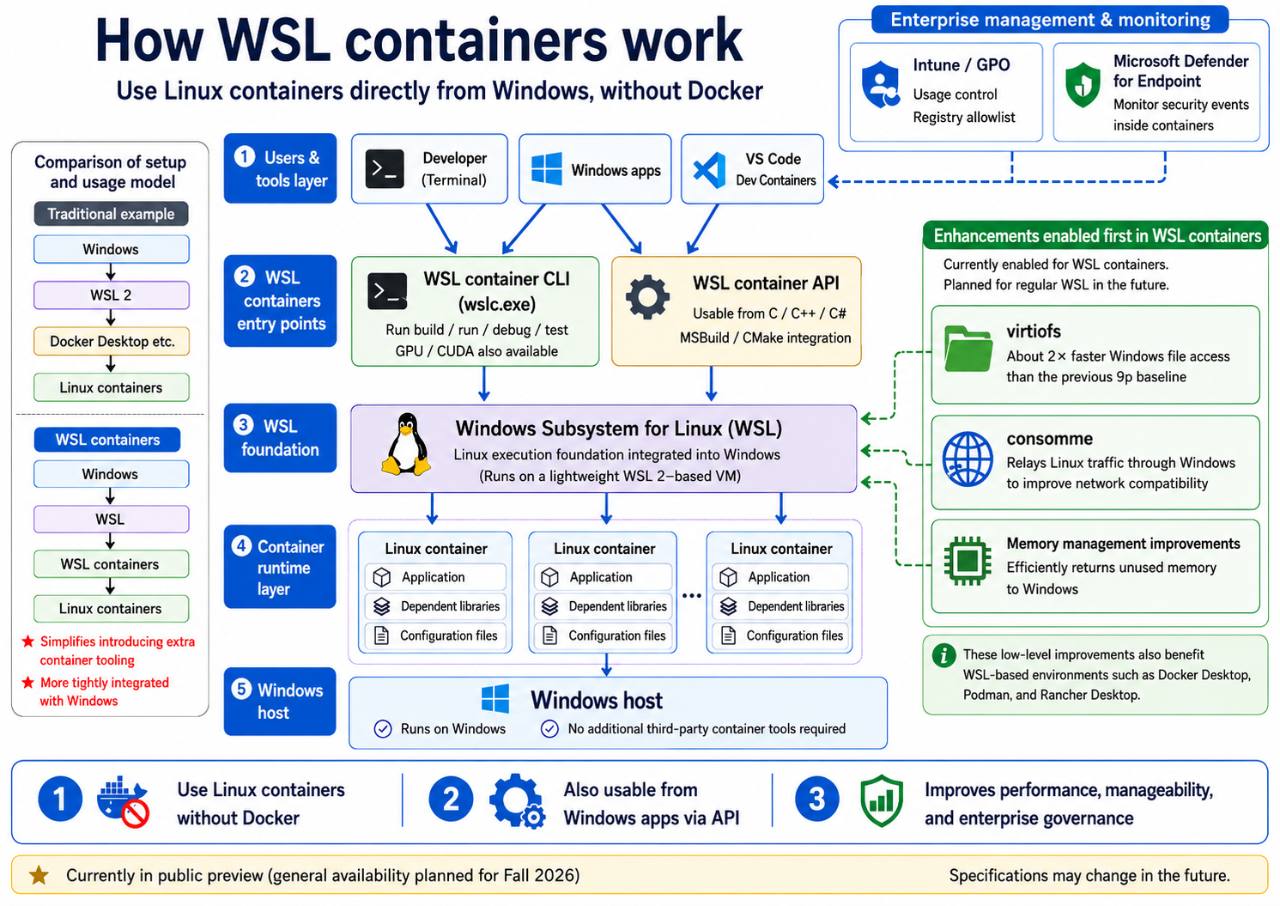
WSL containers architecture. The diagram shows the user/tool layer, CLI/API layer, WSL substrate, container execution layer, and Windows host. The right side shows platform improvements such as virtiofs, consomme, and memory reclaim. The upper-right area shows enterprise management through Intune/GPO and Microsoft Defender for Endpoint.
What Is New
The new part is that Windows gets a first-party entry point for controlling Linux containers through WSL.
Until now, Linux container workflows on Windows usually relied on Docker Desktop, Podman Desktop, or another third-party desktop tool. Another practical route has been installing Docker Engine directly inside a WSL2 distribution. WSL containers moves the first-party entry point into WSL itself. wslc.exe handles build, run, debug, and test workflows, while Windows applications can call containers through a dedicated API. 13
Two pieces are being added.
- CLI (
wslc.exe): A Windows-side executable added to the path after updating WSL. It supports familiar operations such asrun,build,image list, andcontainer list. Microsoft also includes acontainer.exealias. 13 - API: A Windows application API delivered through the
Microsoft.WSL.ContainersNuGet package. Microsoft documents C#, C++/WinRT, and C/C++ projections, plus MSBuild and CMake integration. 123
The preview starts with a WSL pre-release update.
# Update WSL to the pre-release channel that includes WSL containers
wsl --update --pre-release
After the update, wslc can be called from PowerShell or Windows Terminal. Microsoft's announcement also shows GPU access through the familiar --gpus all style. 1
wslc run --rm --gpus all pytorch/pytorch:2.5.1-cuda12.4-cudnn9-runtime ^
  python -c "import torch; print(torch.cuda.is_available())"
The key detail is that the user no longer has to open a Linux distribution shell first. wslc.exe is a Windows executable, which makes it easier to call from Windows applications, build tools, and scripts.
Who It Helps, and Who It Does Not
WSL containers helps organizations that manage many Windows developer machines more than it helps an individual developer.
The baseline matters. Docker Desktop licensing is often discussed, but Docker Engine can run inside WSL2 without Docker Desktop. Docker's own documentation treats Docker Desktop separately from Docker Engine, and Docker Desktop is the component governed by the Desktop subscription terms for larger organizations and some commercial use. 56
Against Docker Engine inside WSL2, "free Linux containers" is not a differentiator. Three differences remain.
| Lens | Docker Engine inside WSL | WSL containers |
|---|---|---|
| Installation | Manage Engine inside each distro | Delivered through the WSL update path |
| Control surface | docker inside a Linux shell | Windows-side wslc.exe and API |
| Enterprise management | Requires separate design | Built around GPO/ADMX, Intune, and MDE integration |
| App integration | Build your own CLI/API bridge | First-party Windows API |
Individuals and Small Teams: Little Reason to Migrate
For a developer who already has Docker Engine running reliably inside WSL2, the direct benefit is modest. WSL containers reduces distro-specific daemon setup and exposes a Windows-side wslc.exe entry point. That is useful, but it is not enough by itself to justify replacing a working workflow.
The case is even weaker if the team depends on existing docker compose workflows. As of the 2.9.3 public preview release notes, Compose compatibility is not listed as a headline capability. Teams should validate before planning any replacement. 2
Enterprise Governance: The Real Difference
The hard problem with Docker Engine inside user-managed distros is organization-level enforcement.
Microsoft says administrators will be able to control WSL distro and container usage through Intune/GPO, and to restrict container image pulls through registry allowlists. Microsoft Defender for Endpoint integration is also being extended so WSL container events can be recognized, though that part is currently in private preview. 14
To be fair, Docker Engine can also be partially managed by distributing configuration such as daemon.json. The difference is enforcement boundary. A daemon inside a user-controlled Linux distribution remains easier for that user to alter. WSL containers moves more of the policy surface into Windows management through GPO and Intune.
API Integration: Narrow but New
The API matters for Windows application developers. A native Windows app can reuse Linux-specific code, run a cloud-oriented component locally, or fold container build and deployment into an application build. That is more useful for tool builders and enterprise app teams than for someone who only wants a terminal-based Docker replacement. 3
virtiofs and consomme are also useful, but they should be treated as a preview advantage rather than a permanent moat. Microsoft frames these lower-level changes as enabled first for WSL containers while broader WSL defaults are being worked toward. 1
How It Works
wslc run is a Windows-side frontend that delegates container work into the WSL 2 Linux substrate.
WSL 2 runs a Linux kernel inside a lightweight utility VM. Microsoft Learn describes WSL 2 as using virtualization technology to run a Linux kernel in a managed lightweight VM. WSL containers uses that substrate, then exposes container lifecycle operations through wslc.exe and the Windows API. 7
The flow is straightforward. wslc receives a command. A WSL-backed session manages images and containers. Container process output and exit state are returned to Windows. For applications, Microsoft exposes related objects such as Session, Container, and Process so the same lifecycle can be handled programmatically. 3
The preview also includes three lower-level WSL improvements. The important caveat is that they are enabled first for WSL containers, while broader WSL defaults are a future goal. File-system and networking behavior are critical paths, so staged rollout is the sensible reading. 1
virtiofs Makes Cross-OS File Access Faster
virtiofs is the new default file system path for WSL containers when accessing Windows files.
Microsoft says it makes Windows file access 2x faster for WSL containers. That matters because cross-OS file access has long been a weak spot when workloads touch many small files, such as node_modules, package restores, and Git working trees. 1
This should not be read as "all WSL file access has switched to virtiofs." Microsoft's post says the changes are currently enabled just in WSL containers and are being worked toward as WSL defaults in the future. 1
consomme Inherits the Host Network Environment
consomme is a user-mode NAT that relays guest networking through ordinary host sockets.
The OpenVMM guide explains that Consomme receives raw Ethernet frames from the virtual NIC, parses them, and translates traffic into host socket calls. Because traffic flows through standard host networking APIs, host firewall rules, VPN routing, and proxy settings apply naturally. 8
That is useful in enterprise networks. Many WSL issues come from a gap where the Windows browser can reach a corporate API, but a Linux tool inside WSL cannot resolve DNS or use the right proxy path. consomme is aimed at reducing that class of mismatch.
Memory Reclaim Improves Host Behavior
The preview also includes improvements for returning unused memory from the Linux VM back to Windows.
WSL 2 is convenient, but developers have often noticed that VM memory can stay committed longer than expected. Microsoft's lower-level work aims to gradually and consistently release memory back to the Windows host when it is no longer in use. That may matter in short-lived container workflows that repeatedly create and delete workloads. 1
Current Limits
WSL containers is still too early to treat as a production standard.
The first reason is the release channel. As of June 30, 2026, WSL containers is available through pre-release WSL as a public preview. Microsoft says general availability is targeted for fall 2026. It is appropriate for validation, not for broad enterprise rollout without guardrails. 12
The second reason is Docker ecosystem compatibility. The WSL 2.9.3 release notes list lifecycle operations, images, networking, volumes, GPU support, SDKs, MSBuild/CMake integration, and policy support. Compose compatibility is not listed as a headline capability. Teams that depend heavily on docker compose should test before planning any replacement. 2
The third reason is consomme's networking limits. Consomme improves host-network compatibility, but it does not process general multicast or broadcast discovery, does not relay ICMP errors, has partial traceroute behavior, and drops protocols such as GRE, ESP, and SCTP. Workflows depending on mDNS, Bonjour, SSDP, or UPnP need explicit validation. 8
The fourth reason is surrounding tool maturity. VS Code Dev Containers support is in 0.462.0-pre-release, Intune dashboard support is expected within weeks, and MDE container awareness is in private preview. Enterprise adoption depends on those management and monitoring pieces, not only on the CLI. 1
The practical adoption test is clear. A personal proof of concept is worth trying. A replacement plan for Docker Engine inside WSL2 should first test Compose, private registries, proxies, VPNs, Dev Containers, and security monitoring.
How To Try It
Start by accepting that this switches WSL to a pre-release path.
Microsoft's tutorial shows a simple flow: update WSL, verify wslc version, and run wslc run --rm hello-world. Use a personal test machine or disposable environment before putting it on a standard developer image. 9
wsl --update --pre-release
wslc version
wslc run --rm hello-world
Then test a narrow slice of your own workload. Start with a single-container web app, then a GPU workload if relevant, then private registry pulls behind your proxy, and only then Dev Containers.
Summary
The evaluation of WSL containers changes depending on the baseline. Compared with Docker Desktop, it looks like a first-party path that may reduce Desktop dependency. Compared with Docker Engine inside WSL2, the migration case is much narrower.
For individuals and small teams, the benefit is thin if Docker Engine inside WSL2 already works. The main gains are setup simplification and a Windows-side entry point.
The important shift is enterprise governance. Registry allowlists, Intune/GPO enforcement, Defender integration, and a Windows API are the parts Docker Engine inside a user-managed distro does not naturally provide. WSL containers is best understood not as "Docker, but Microsoft," but as an attempt to make Windows a more governable Linux container host.
The next inflection point is fall 2026. By then, the practical question will be whether Compose compatibility, Dev Containers, Intune, MDE, and broader virtiofs/consomme rollout have matured enough to support real teams. Only then does the individual-developer migration case become stronger.