Claude Share Links Appeared in Google Search: How to Audit and Revoke Access
Beginning July 25, 2026, users and news organizations reported that shared Claude chats and published artifacts were appearing in Google Search. Anthropic added noindex to shared pages and Google began removing results, according to Decrypt, but results on other search engines and copies already collected by third parties may remain.5
Anyone who may have shared Claude content should audit the sharing state inside Claude instead of waiting for search results to disappear. If the content included credentials, revoke and reissue them before treating unsharing as sufficient.
| Finding | First response | Claude action |
|---|---|---|
| Credentials are present | Preserve minimal evidence, then revoke keys or tokens | Unshare or unpublish immediately afterward |
| Personal or internal data is present | Record scope and the exposure window | Revoke access and notify the organization's response owner |
| No sensitive data is apparent | Decide whether sharing is still necessary | Revoke access if it is not |
Shared chats can be audited from Privacy settings
On Free, Pro, and Max plans, open Settings > Privacy, find Shared chats under Privacy settings, and select Manage. The modal lists each shared chat's title, sharing date, and link. Use Unshare beside an entry to revoke access. If there are no shared snapshots, Claude displays No shared content found.1
To revoke one chat from the conversation itself, open the Share menu and change its visibility from Public to Private. If the same chat is unshared and shared again, the new snapshot includes messages added since the previous share, so review the conversation before recreating the link.1
Team and Enterprise chat sharing is limited to members of the same organization. The primary public-indexing audit applies to snapshots created from Free, Pro, and Max accounts.
Published artifacts must be revoked individually
Anthropic's documentation says a published artifact is added to the Artifacts section in the sidebar. Open each artifact from that list and select Unpublish to revoke public access.2
Unpublishing has irreversible consequences. The same artifact cannot be published again, and publishing it later requires creating a new artifact. If it used persistent storage, unpublishing also permanently deletes its associated personal and shared storage data.2
Copy code or required data to an approved location before unpublishing when retention is necessary. Do not let that export delay credential revocation if the public artifact contains secrets.
Exposed credentials must be revoked before access is considered contained
Treat any API key, access token, password, session secret, or cloud credential displayed on a public page as compromised. Unsharing stops future direct access to the source page. It cannot invalidate copies already collected by a search engine, viewer, or archive.
A public repository collected 453 Claude conversations and 519 Grok conversations from public share links, totaling 11,241 messages.5 Those Claude and Grok counts were still visible in the repository breakdown on July 28, 2026, although the archive can continue to change.
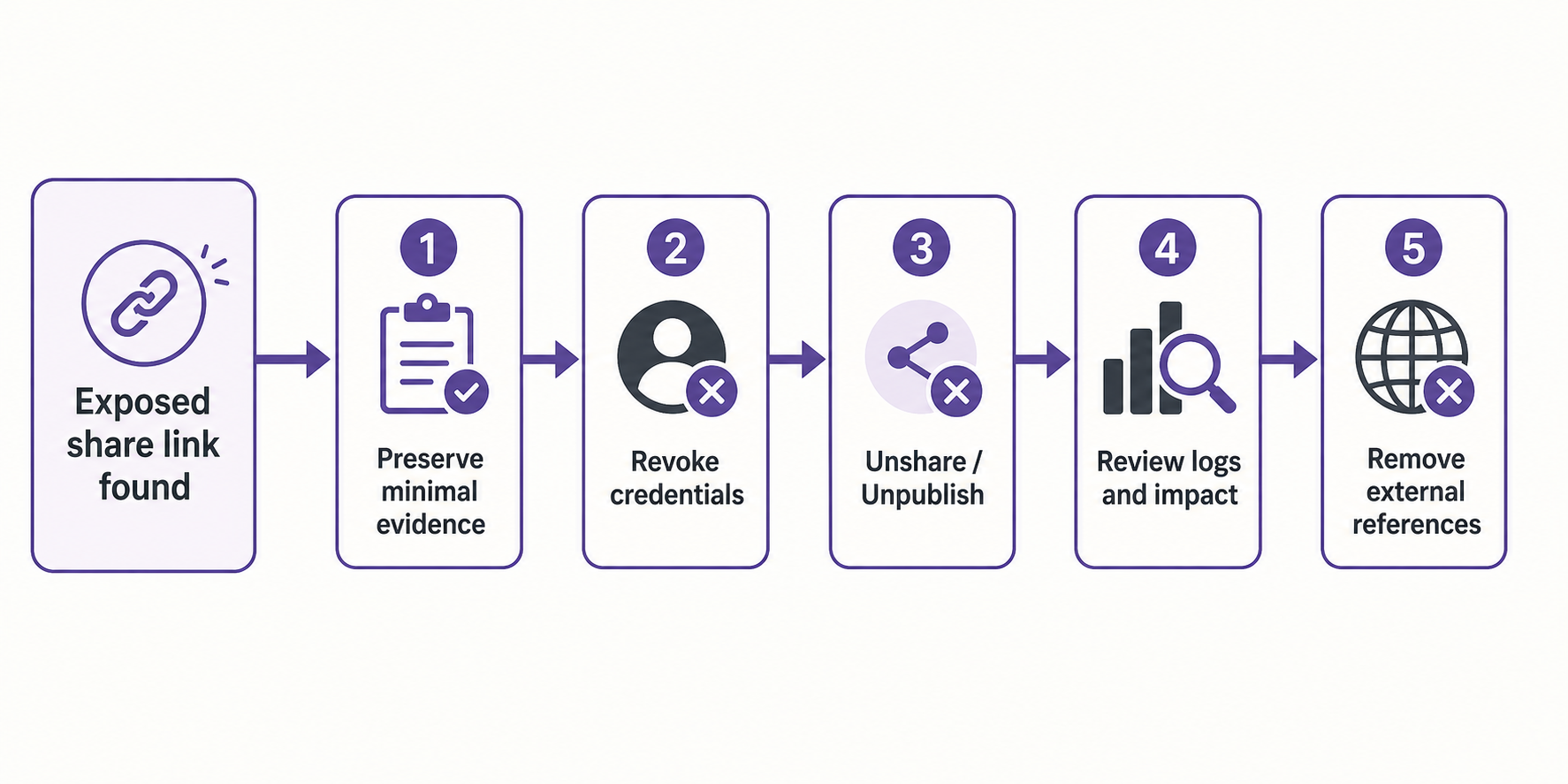
Use this response order.
- The user or incident owner preserves the minimum evidence needed to show the URL, timestamp, and exposed material.
- The credential owner revokes affected keys, tokens, passwords, and sessions, then issues replacements.
- The Claude share owner unshares the chat and unpublishes the artifact.
- The system owner reviews authentication and usage logs for misuse and determines the affected scope.
- The security or legal owner decides whether notification or regulatory reporting is required.
Do not create unnecessary copies of personal data or secrets while preserving evidence. Store evidence behind access controls and record who collected it and when.
Search results and embed locations are separate exposure paths
In addition to Claude's own share list, combine site:claude.ai with your name, organization, product, or an internal identifier to look for forgotten links. Limit this search to information you own or administer rather than exploring other people's shared content.
Publishing an artifact also creates a Get embed code option for domains the publisher allows.2 If a public website, company wiki, social post, forum, issue, or chat log contains the embed or share URL, remove that reference alongside revoking the Claude page.
A share disappearing from search does not prove that its direct URL is disabled. Search-result removal does not replace revocation inside Claude.
Snapshot contents depend on how material was attached
A shared-chat snapshot includes messages and artifacts created before the share. Messages added afterward stay private unless the chat is unshared and shared again.1
Uploaded files themselves are not included in the chat snapshot, and raw data retrieved through MCP tool calls remains hidden. The conversation and Claude's final output are visible, however, so any file or tool data copied into those outputs is within the shared content.1
Artifact sharing on Team or Enterprise has a different boundary. Viewers also gain access to attachments and files in the conversation that created the artifact, so internal sharing still requires reviewing the source conversation.2
An unlisted-looking URL is not an access-control system
A hard-to-guess URL can still be discovered after it is posted on a public site or social network. Content that requires a limited audience should travel through a channel with authentication and authorization, not a public share link.
On Free, Pro, and Max, Publish makes an artifact available to anyone with the link, including viewers without a Claude account. On Team and Enterprise, Share is organization-only, viewers must authenticate, and public artifact publishing is unavailable.2
This distinction separates the expectation that "only recipients will see the link" from an actual access-control boundary. The operational rule against putting secrets in public links remains necessary even after indexing behavior is fixed.
robots.txt alone cannot keep a web page out of search results
A Disallow rule in robots.txt tells a crawler not to fetch a URL. It is not a directive to remove a web page from search. When other pages link to a blocked URL, Google can still recognize and display the URL or public anchor text without fetching the page body.3
A noindex rule is delivered in an HTML meta tag or HTTP response header. If robots.txt prevents the crawler from fetching the page, the crawler cannot read an in-page noindex rule, so the two controls can counteract the intended result.4
Decrypt reported that Anthropic had blocked shared URLs in robots.txt but initially omitted noindex. It also reported that Google began reducing results on July 26 after Anthropic changed the configuration, while Bing still returned shared links when the article was published.5
This was not a reported compromise of every private Claude conversation. The reported pages were chats or artifacts that users had explicitly shared or published.6 That requirement does not resolve the separate question of whether users reasonably understood that public sharing could lead to search indexing.
Incident response continues after the share is revoked
After revocation, check for credential misuse, notification duties involving personal or customer data, and references that remain on external sites. For an organizational account, preserve the record and hand it to security, legal, or privacy owners rather than closing the incident as an individual action.
Update the preventive workflow as well. Combine data classification for Claude inputs, a pre-share review, periodic audits of public links, and a rule against pasting credentials into conversations. Search-engine indexing controls reduce discoverability; they do not provide access control.
Related Articles
- Use Claude Security to Run Layered Code Scans
- Assessing Security Risks in AI Agent Systems
- Emergency Recovery After GitHub Secrets Exposure
Anthropic Help Center, "Share and unshare chats," June 15, 2026. ↩↩↩↩
Anthropic Help Center, "Publish and share artifacts," accessed July 2026. ↩↩↩↩↩
Google Search Central, "Block Search indexing with noindex." ↩
Decrypt, "Your Shared Claude Chats Were Being Quietly Published on Google," July 27, 2026. ↩↩↩
VentureBeat, "Some Claude shared conversations and Artifacts appear in Google Search," July 26, 2026. ↩