Claude Code Cross-Session Messaging: Permission Boundaries and Organization Controls
Boundaries to decide before rollout
| Situation | Decision |
|---|---|
| Independent local sessions need to pass findings or warn about a breaking change | Use cross-session messaging |
| A conversation, context, or files must move to another session | Resume the session instead |
| A headless worker must receive messages unattended | Set crossSessionInbound: "accept" and restrict the worker's own permissions separately |
| The organization must disable the feature | Deny the send tools and refuse inbound messages in managed settings |
Anthropic released cross-session messaging in Claude Code v2.1.224 on August 7, 2026.2 Separately launched Claude Code sessions can exchange text directly, but a message cannot approve an action for the user or alter the receiving session's permission configuration.1 An organization therefore needs to decide not only whether sessions may communicate, but also when inbound messages are accepted and how managed settings turn the feature off.
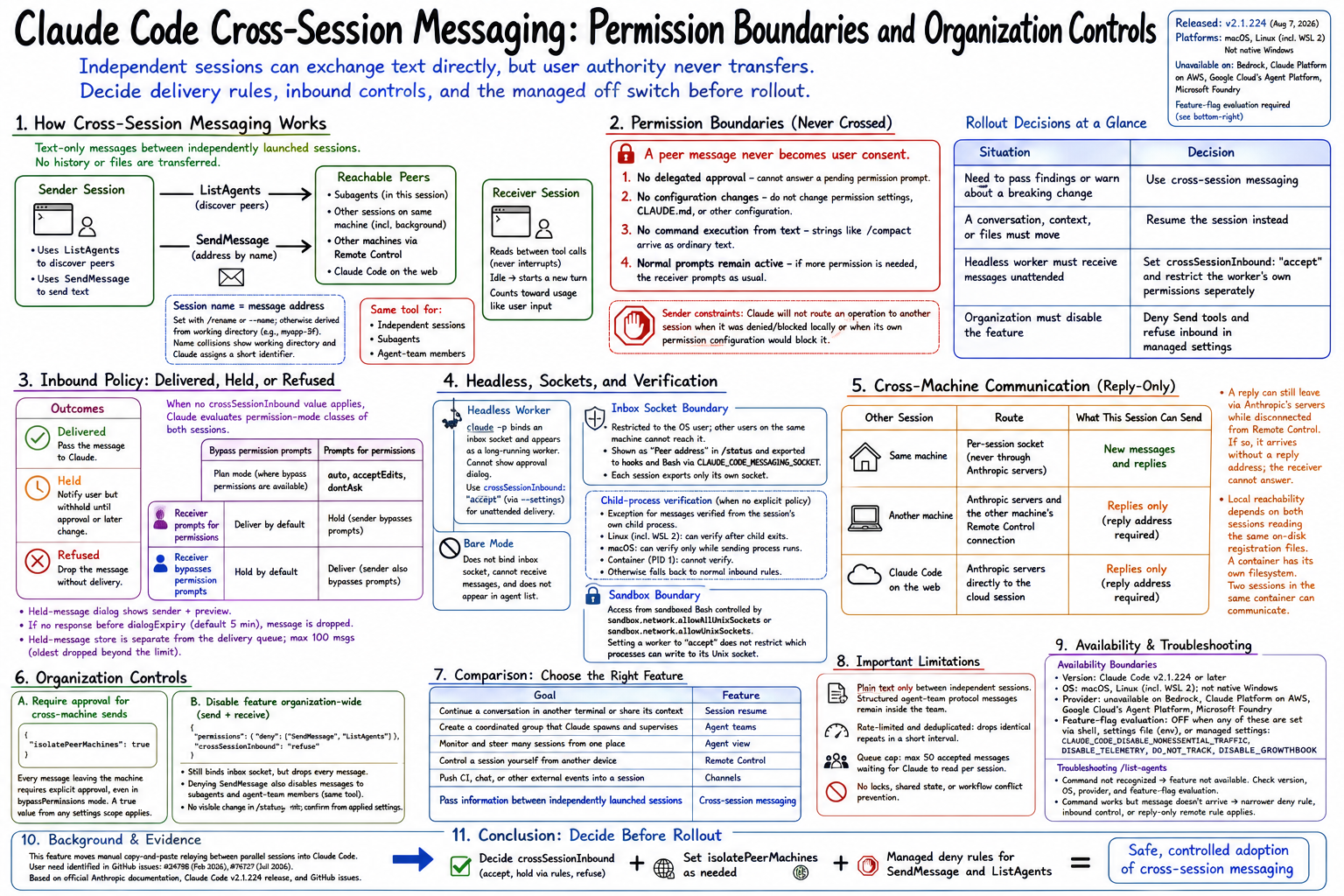
Claude takes over the manual relay between sessions
When several Claude Code sessions run in parallel, users have traditionally moved information between them by copying text across terminals or explaining the same result again. Cross-session messaging moves that relay into Claude Code. One session can warn another that a change will break its work, or send the answer to a question that the other session was waiting on.1
Messages do not carry conversation history or files
The channel carries text only. It never transfers conversation history or files, so resuming a session remains the correct mechanism for moving a conversation and its context.1
Claude uses ListAgents and SendMessage internally
The user does not call the peer tools directly. Claude uses ListAgents to discover reachable agents and SendMessage to address one by name.1 The same SendMessage tool also serves subagents and agent-team members inside a session or team.
A session name becomes its message address
Users can name a session with /rename or the --name startup flag. Without an explicit name, Claude Code derives one from the working directory, such as myapp-3f.1
If names collide, /list-agents shows each local working directory. Claude's own listing also assigns a short identifier so that it can address the intended session.
list-agents shows the currently reachable peers
/list-agents, also available as /peers, covers three groups.1
- Subagents running inside the current session. Agent-team members use the team's own roster and are not listed here
- Other sessions on the same machine, including background sessions
- Sessions on other machines and Claude Code on the web while Remote Control is connected
The receiver reads between tool calls
During an active turn, the receiving Claude reads a message between tool calls, so a running tool is never interrupted. If the receiving session is idle, the message starts a new turn.1
Once delivered, a peer message counts toward usage like a prompt entered by the user.
A peer message never becomes user consent
Claude Code tells the receiver that the message came from another session rather than the user. That distinction preserves four boundaries.1
- No delegated approval: a peer message cannot answer a pending permission prompt or count as the user's consent
- No configuration changes: the receiver is instructed not to alter permission settings,
CLAUDE.md, or other configuration because a peer requested it - No command execution from text: a string such as
/compactarrives as ordinary text - Normal prompts remain active: if the requested work needs another permission, the receiving session prompts as usual
The sender is constrained as well. Claude is instructed not to route an operation to another session when that action was denied or blocked locally, or when its own permission configuration would block it.1
Inbound policy produces Delivered, Held, or Refused
The receiving session evaluates every arriving message and reaches one of three outcomes.1
| Outcome | Behavior |
|---|---|
| Delivered | Pass the message to Claude |
| Held | Notify the user but withhold the message until approval or a later permission-mode or settings change |
| Refused | Drop the message without delivery |
When no crossSessionInbound value applies, Claude Code evaluates the permission-mode classes of both sessions. Sessions that bypass permission prompts form one class and all others form the second. Plan mode counts as bypassing where bypass permissions are available, while auto, acceptEdits, and dontAsk count as prompting.1
- The receiver prompts for permissions: deliver by default, but hold a message when the sender reports that it bypasses prompts
- The receiver bypasses permission prompts: hold by default, but deliver when the sender also reports that it bypasses prompts
A held-message dialog includes the sender and a preview. If the user does not respond before dialogExpiry, which defaults to five minutes, Claude Code closes the dialog and drops the message.1 The held-message store is separate from the delivery queue and keeps at most 100 messages, dropping the oldest beyond that limit.
Headless sessions need an explicit receive policy
A claude -p headless session binds an inbox socket and can appear as a long-running worker in the peer listing.1 It cannot display an approval dialog, so a held message remains held. For unattended delivery, start the worker with crossSessionInbound set to accept through --settings.
A session started in bare mode does not bind an inbox socket, cannot receive messages, and does not appear in the agent list.1
The inbox socket is another session-specific permission boundary
Claude Code restricts an inbox socket to the operating-system user, so another user's sessions on a shared machine cannot reach it.1 The socket appears as Peer address in /status and is exported to hooks and Bash commands through CLAUDE_CODE_MESSAGING_SOCKET. Each session exports only its own socket rather than an address inherited from a parent process.
When no explicit crossSessionInbound value applies, Claude Code has an exception for a message it can verify came from the session's own child process. Linux, including WSL 2, can verify a child after it exits; macOS can verify only while the sending process is running, and a container where Claude Code is PID 1 cannot verify it.1 An unverifiable message returns to the normal inbound rules.
Access from sandboxed Bash is controlled separately through sandbox.network.allowAllUnixSockets or sandbox.network.allowUnixSockets. Setting an unattended worker to accept does not by itself restrict which processes can write to its Unix socket.
Cross-machine communication is reply-only
The location of the other session determines both the route and what can be sent.1
| Other session | Route | What this session can send |
|---|---|---|
| Same machine | Per-session socket, never through Anthropic servers | New messages and replies |
| Another machine | Anthropic servers and the other machine's Remote Control connection | Replies only |
| Claude Code on the web | Anthropic servers directly to the cloud session | Replies only |
A reply to a cross-machine message can still leave through Anthropic's servers while the replying session is disconnected from Remote Control. In that case it arrives without a reply address, so the receiver cannot answer it.1
Local reachability depends on whether both sessions can read the same on-disk registration files. A container has its own filesystem, so a host session and a container session cannot see each other. Two sessions in the same container can communicate.
Organizations control sending and receiving separately
Sending and receiving are separate controls, which matters when an organization decides whether to adopt the feature.
Cross-machine sends can always require approval
{
  "isolatePeerMachines": true
}
With isolatePeerMachines set to true, every message leaving the machine requires explicit approval.1 The requirement still applies in bypassPermissions mode. Because a true value from any settings scope applies, a checked-in project setting can enable the requirement but cannot turn it off at a lower scope.
Managed settings can disable the feature organization-wide
An administrator must combine an outbound tool denial with an inbound refusal.1
{
  "permissions": {
    "deny": ["SendMessage", "ListAgents"]
  },
  "crossSessionInbound": "refuse"
}
Claude Code still binds an inbox socket under this configuration, but it drops every message that arrives. Denying SendMessage also disables messages to subagents and agent-team members because they share the same tool.
A refusing session shows no visible change in its own /status or in another session's listing. Administrators must confirm enforcement from the applied settings.
Availability depends on version, OS, provider, and environment
When a session meets the requirements, the feature is available without a separate enablement step.1 Cross-session messaging has four availability boundaries.1
- Version: Claude Code v2.1.224 or later
- Operating system: macOS and Linux, including Linux under WSL 2; not native Windows
- Provider: unavailable on Amazon Bedrock, Claude Platform on AWS, Google Cloud's Agent Platform, and Microsoft Foundry
- Feature-flag evaluation: the feature stays off when
CLAUDE_CODE_DISABLE_NONESSENTIAL_TRAFFIC,DISABLE_TELEMETRY,DO_NOT_TRACK, orDISABLE_GROWTHBOOKdisables the evaluation it depends on
Those environment variables can come from the shell, a settings file's env map, or managed settings. An organization that broadly disables telemetry for privacy may therefore disable messaging unintentionally.
/list-agents separates the two main failure classes.1
- The command is not recognized: the session does not have the feature; start with
claude --versionand work through the availability requirements - The command works but the message does not arrive: the feature is active, and a narrower deny rule, inbound control, or reply-only remote rule applies
The channel is limited to plain text and throttled queues
Structured agent-team protocol messages remain inside the team. Independent sessions exchange plain text only.1
Claude Code rate-limits repeated messages by sender, drops identical repeats that arrive within a short interval, and caps accepted messages waiting for Claude to read at 50 per session. Those controls stop simple loops, but they do not provide locking, shared state, or workflow conflict prevention.
The correct feature depends on who owns the work
The official documentation distinguishes each multi-session mechanism by purpose.1
| Goal | Feature |
|---|---|
| Continue a conversation in another terminal or share its context | Session resume |
| Create a coordinated group that Claude spawns and supervises | Agent teams |
| Monitor and steer many sessions from one place | Agent view |
| Control a session yourself from another device | Remote Control |
| Push CI, chat, or other external events into a session | Channels |
| Pass information between independently launched sessions | Cross-session messaging |
Cross-session messaging fills the last gap. It connects sessions that the user started independently and that are not members of one Claude-supervised team.
The improvement targets multi-session users
Users who run several Claude Code sessions in parallel gain a direct replacement for manual relaying. A single-session workflow does not change.
The request predates the product release. In February 2026, an Anthropic repository issue described Markdown handoffs and copy-and-paste through the user as workarounds for coordinating parallel sessions.3
A July 2026 issue reported that independently launched sessions sharing one repository and worktree lacked a first-class coordination mechanism.4 Cross-session messaging addresses information transfer within that gap. It does not add mutual exclusion, a shared state store, or automatic protection against worktree conflicts.
Fresh releases require primary-source verification
The official v2.1.224 release contains 31 change bullets and also adds claude self-hosted-runner for Team and Enterprise plans.2 Because several substantial features shipped together, a headline summary can easily omit OS support, provider exclusions, inbound-policy exceptions, or queue limits.
Rollout decisions should track the version, operating system, provider, setting names, and numeric limits in the official documentation and release notes. Claims about adoption, social response, or productivity gains require separate evidence and should not be treated as product specifications.